How to Automatically Sync Bulk Invoice Data to Tally Prime in 5 Minutes using EdocSmart (2026 Step-by-Step Guide)
If you’re a CFO or a business owner in India, you know the drill. It’s month-end, the GST filing deadline is breathing down your neck, and your accounts team is buried under a mountain of paper invoices and PDFs. Manually typing every single gst invoice entry in tally prime isn’t just exhausting—it’s a recipe for errors that can lead to costly GST mismatches.
If you’re a CFO or a business owner in India, you know the drill. It’s month-end, the GST filing deadline is breathing down your neck, and your accounts team is buried under a mountain of paper invoices and PDFs. Manually typing every single gst invoice entry in tally prime isn’t just exhausting—it’s a recipe for errors that can lead to costly GST mismatches.
By 2026, the speed of business in India has outpaced manual data entry. We need smarter systems. That’s where EdocSmart comes in. In this guide, I’m going to show you how to move from hours of manual typing to a 5-minute automated sync.
1. The Real Cost of Manual Data Entry
Let’s be honest: nobody enjoys doing a purchase invoice entry in tally. Whether you are using the older version and looking for purchase invoice entry in tally erp 9 or you’ve upgraded to the latest version, the pain is the same.
A typical accountant spends roughly 3 to 5 minutes on a single gst bill entry in tally prime. If your business handles 500 invoices a month, that’s over 30 hours wasted on data entry alone. Plus, one wrong GSTIN or a typo in the taxable value, and your GSTR-2B reconciliation becomes a nightmare.
Expert Tip: Manual errors are the #1 cause of blocked Input Tax Credit (ITC). Automating your purchase bill entry in tally with gst ensures that what you see on the invoice is exactly what ends up in your books.
2. Why Automated GST India Tax Compliance Automation is Essential
In 2026, gst india tax compliance automation isn’t just a luxury; it’s a survival tool. With real-time e-invoicing and strict ITC matching rules, your Tally data must be 100% accurate.
Using a tool like EdocSmart allows you to bridge the gap between your physical/digital invoices and your accounting software. It’s designed to handle everything from a standard purchase invoice entry in tally prime to complex multi-item bills without you having to touch the keyboard.
3. Comparing Manual vs. Automated Entry
| Feature | Manual Data Entry | EdocSmart Automation |
|---|---|---|
| Speed per Invoice | 3 - 5 Minutes | 10 - 15 Seconds |
| Accuracy | Prone to human error | 99.9% (AI-driven OCR) |
| Bulk Processing | One by one | Hundreds at once |
| GST Validation | Manual check required | Auto-validation of GSTIN |
| Compliance | High risk of mismatches | Built-in compliance checks |
4. Step-by-Step: Syncing Bulk Invoices with EdocSmart
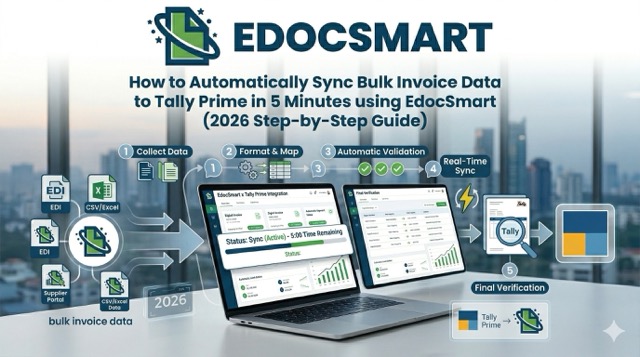
Ready to reclaim your time? Here is how you can perform a bulk gst invoice entry in tally prime in just five minutes.
Step 1: Upload Your Invoices
Gather all your purchase bills—PDFs, scans, or even photos. Upload them to the EdocSmart portal. Whether it’s a purchase bill entry in tally erp 9 format or a modern e-invoice, the system reads it instantly.
Step 2: AI Data Extraction
EdocSmart’s AI engine scans the invoices. It identifies the vendor name, GSTIN, invoice number, date, HSN codes, and tax bifurcations (CGST/SGST/IGST). This replaces the tedious task of a manual purchase invoice entry in tally.
Step 3: Review and Map
The system will highlight any discrepancies. You can quickly map the ledgers. For example, if you are doing a purchase bill entry in tally erp 9 for a specific expense, you just ensure the ledger names match your Tally setup.
Step 4: One-Click Sync to Tally
Once reviewed, click “Sync.” The data flows directly into your Tally Prime or ERP 9 environment. Your gst invoice entry in tally prime is now complete without any manual typing.
Step 5: Verify the Entry
Open Tally, go to your Purchase Register, and you’ll see all your entries perfectly recorded, including the gst bill entry in tally prime details and tax breakdowns.
5. Handling Different Scenarios (With and Without GST)
Not every bill is the same. Sometimes you need to record a without gst bill entry in tally prime for unregistered dealers or small expenses.
- Standard Purchase: Use EdocSmart to automate the purchase bill entry in tally with gst.
- Unregistered Dealers: EdocSmart recognizes when a GSTIN is missing and flags it as a without gst bill entry in tally prime, ensuring your accounting remains compliant with reverse charge or composition scheme rules.
- Payments: Many users ask, what is the gst payment entry in tally? While EdocSmart handles the purchase side, having clean purchase data makes the payment entry much easier to reconcile later.
6. Real-World Success Story: A Delhi Distributor
Let’s look at Khanna Electronics, a distributor based in Nehru Place, Delhi. They were struggling with over 800 purchase invoices a month.
Their junior accountant was spending his entire week just figuring out how to entry purchase bill in tally erp 9 with gst. They were consistently late on their GSTR-3B filings because the data entry was never finished on time.
After switching to EdocSmart, they reduced their data entry time by 90%. Now, the accountant simply uploads the week’s folders of invoices on Friday morning, reviews them over a cup of chai, and syncs them. The gst invoice entry in tally prime that used to take 40 hours now takes less than 2 hours a month.
7. FAQs
Does EdocSmart work with older versions like Tally ERP 9?
How does the system handle multi-page invoices?
Can I process invoices that don’t have GST?
Is the data secure?
What about errors in the physical bill?
8. Conclusion: Stop Typing, Start Growing
As we move further into 2026, the role of a finance team is shifting from “data entry operators” to “financial strategists.” You shouldn’t be wasting your talent on manual gst invoice entry in tally prime.
By adopting EdocSmart, you’re not just buying software; you’re buying back your time and ensuring your business is 100% compliant with Indian tax laws. Whether you are looking for a better way for purchase invoice entry in tally prime or need to clean up your purchase bill entry in tally with gst, automation is the answer.
Ready to see the magic yourself? Experience the future of accounting with EdocSmart today and get your first batch of invoices synced in minutes!
Reduce repetitive accounting work
Explore a practical EDOCSMART workflow for faster, structured accounting automation.
Explore EDOCSMART