GST Reconciliation Software for Automated GSTR 2B Reconciliation
Compare your Purchase Register and GSTR-2B through one structured workflow, understand every reconciliation step, and review matched, partially matched and missing invoices in a consolidated report.
Two Excel Files Can Look Correct—Until You Compare Them
A finance team may already have a clean Purchase Register and a freshly downloaded GSTR-2B report . Individually, both files can look correct. The real problem appears only when the two are compared: one invoice may be missing in one file, another may have a slightly different invoice number, a supplier name may be written differently, or the tax values may need review.
What looked like a simple Excel task quickly becomes a reconciliation exercise that needs accuracy, consistency and a clear review process . The user has to know which invoices match, which ones are only partially related, which entries are available in GSTR-2B but missing from the books, and which purchases are in the books but not available in GSTR-2B.
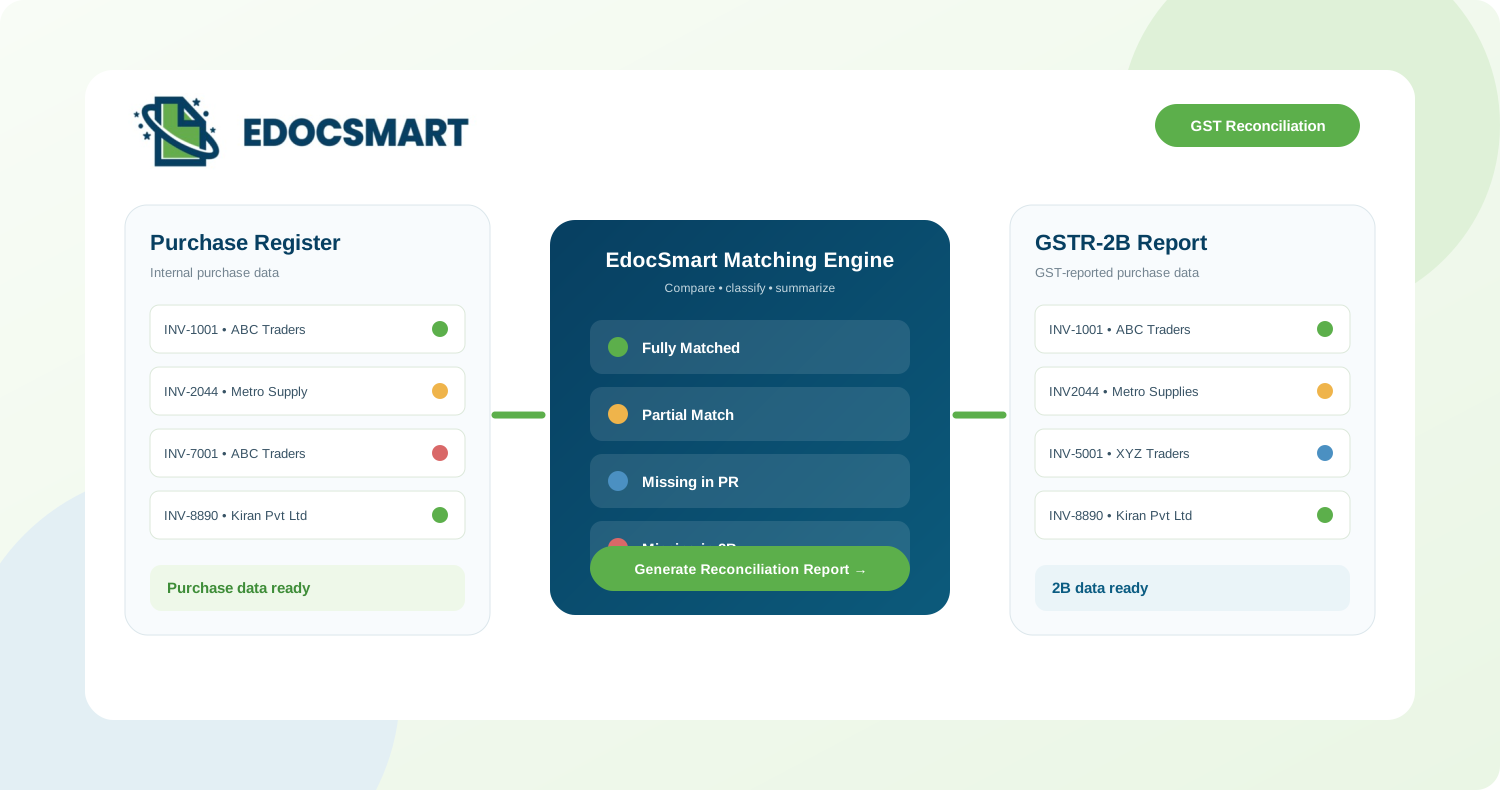
EdocSmart is designed to handle this through GST reconciliation software . The system compares both Excel files, applies the selected GSTIN and reconciliation period, uses the configured header mapping, performs transaction comparison, classifies the results and generates a consolidated report for review.
The goal of GSTR 2B reconciliation is not simply to find identical rows. It is to give the accountant a clear reconciliation status and a practical list of exceptions that require investigation.
What Does GSTR 2B Reconciliation Mean?
GSTR 2B reconciliation compares the purchase transactions recorded in the business books with the transactions available in GSTR-2B. The purpose is to identify whether the corresponding purchase exists in both sources and whether the relevant transaction information matches correctly.
The Purchase Register represents the business's internal purchase records. GSTR-2B represents GST purchase and input-tax-credit related transactions available for the selected GST period. Both files are required because reconciliation needs two independent views of the same purchase activity.
A GSTR reconciliation tool or GSTR 2B reconciliation software makes this comparison repeatable by organizing results into clear categories instead of leaving users to manually filter and match Excel rows.
The same workflow supports ITC reconciliation and ITC matching with GSTR 2B because users can see which purchase records are represented in 2B and which invoices may require further review.
Why Is GST Reconciliation Needed?
In simple terms, GST reconciliation checks whether the purchase data in your books and the purchase data available in GSTR-2B are telling the same story. Many businesses download GSTR-2B and maintain a Purchase Register, but without comparing the two, they may not know where the differences actually are.
For example, your Purchase Register may contain an invoice that does not appear in GSTR-2B , or GSTR-2B may show an invoice that has not yet been recorded in your books. There can also be cases where the invoice exists in both places but the invoice number, supplier details or other relevant values are different.
GST reconciliation is needed because it turns these differences into a clear review list. Instead of assuming that both files match, the accountant can see which transactions are correct, which transactions need manual review and which records may require follow-up with the supplier or the internal accounting team.
It also supports ITC reconciliation by giving the user a clearer view of whether purchase transactions recorded internally are represented in GSTR-2B. The reconciliation result does not replace the accountant's GST or tax decision; it gives them structured information to review before taking that decision.
Identify invoices that are available in GSTR-2B but missing from the Purchase Register, and invoices recorded in the books but missing from GSTR-2B.
Separate exact matches from transactions that look related but contain differences in invoice number, supplier details or other matching fields.
Give the accounting team a structured view of purchase transactions that are represented in GSTR-2B and exceptions that may need further investigation.
Replace repeated filtering, lookup formulas and row-by-row comparison with a repeatable reconciliation workflow and categorized report.
If your books show INV-7001 but the same invoice is not available in GSTR-2B, reconciliation should not hide that difference. It should flag the invoice clearly as Missing in 2B so the accountant knows exactly what needs review.
Why Manual GST Reconciliation in Excel Becomes Difficult
GST reconciliation in Excel can work for a small set of transactions, but repeated filtering, lookup formulas and manual invoice checking become difficult to control when purchase volumes grow or multiple GST registrations are involved.
The primary objective is to identify differences between the internal Purchase Register and GSTR-2B. The reconciliation should answer which invoices are fully matched, which exist in both files but contain differences, which are present in GSTR-2B but missing from the Purchase Register, which are present in the Purchase Register but missing from GSTR-2B, and what the overall reconciliation status is for the selected period.
Invoice number, supplier name, invoice date, GSTIN or relevant values can differ slightly between the two files even when the records appear related.
A transaction can exist in GSTR-2B but be absent from the Purchase Register, or it can be recorded in the Purchase Register but not appear in GSTR-2B.
The accountant needs to know which purchase transactions are represented in 2B before deciding what should be investigated further.
Client files may use different column names such as Supplier GST No, Invoice Dt. or custom internal labels, so the data needs a consistent mapping before comparison.
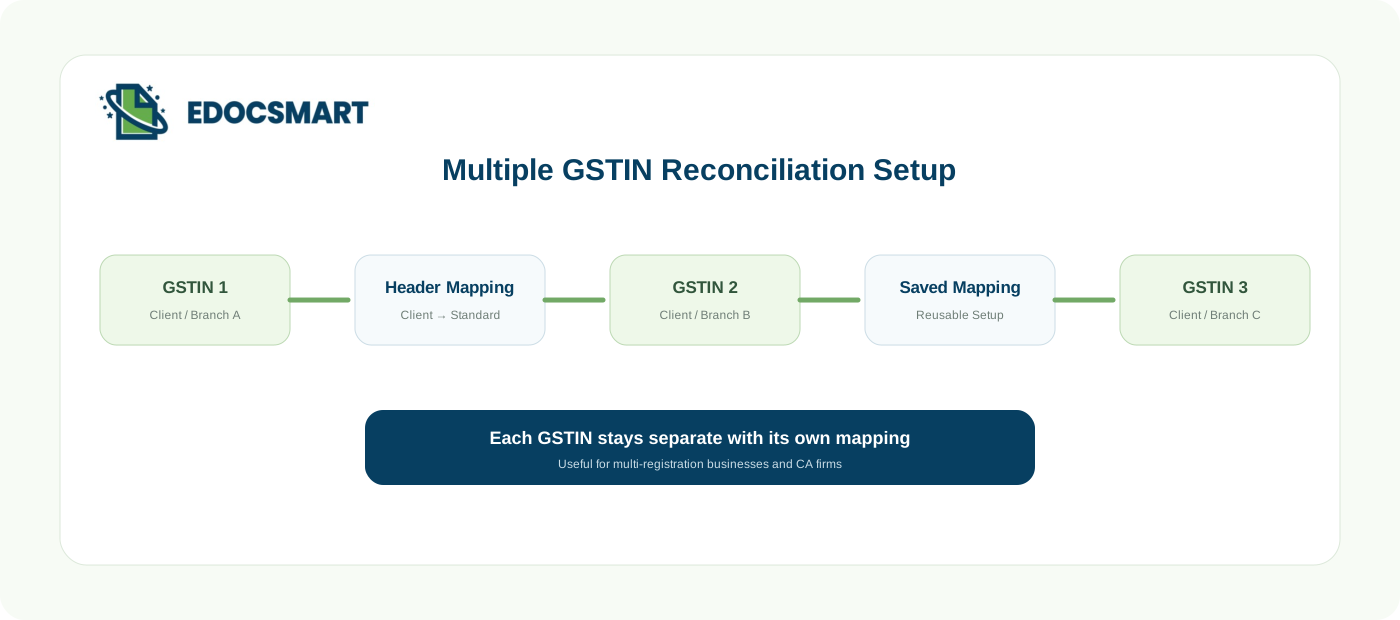
Businesses and CA firms may manage several registrations or clients, and each GSTIN must be reconciled separately.
How EdocSmart Turns Two Excel Files into a Reviewable Reconciliation
EdocSmart performs automated GST reconciliation by bringing the Purchase Register and GSTR-2B into one controlled workflow. The user selects the relevant GST number, chooses the required date range, uploads both Excel files and uses the configured mapping for that GSTIN.
When a new GST number is added, the user can configure how the client's Excel headers map to EdocSmart's standard fields. For example, Supplier GST No → GSTIN and Invoice Dt. → Invoice Date . The exact mapping depends on the client's Excel format.
Once the mapping is saved, that GSTIN is ready for recurring reconciliation. This is useful for businesses with multiple registrations and CA firms that manage multiple clients with different spreadsheet formats.
Instead of creating exception sheets manually, EdocSmart separates the output into Fully Matched, Partial Match, Missing in PR and Missing in 2B .
How the GST Reconciliation Workflow Works
First, see the complete flow in one view. Immediately after that, each step is explained separately in the same order so users can understand exactly what happens from the two source files to the final reconciliation report.
Sign in → open GST Reconciliation → select GSTIN and period → upload both Excel files → reconcile → export and review the Excel report.
See the Complete GST Reconciliation Flow
Scroll through the four product steps. Each clip follows your scroll and shifts left only after that step is complete.
Upload the Purchase Register and GSTR-2B Files
Select the GST Number
Select the Reconciliation Period
Map the Client Excel Headers
Validate, Process and Match the Transactions
Classify the Reconciliation Results
Generate the Consolidated Reconciliation Report
See EdocSmart GST Reconciliation in Action
Watch this short Instagram Reel to see how the GST reconciliation experience looks in a quick, real-world walkthrough.
Watch on Instagram ↗Key Features of the GSTR 2B Matching Software Workflow
A practical GST reconciliation workflow should do more than compare two files. It should make recurring reconciliation easier, keep GST registrations organized, standardize different Excel formats and make exceptions understandable for the accountant who has to act on them.
Save client-specific Excel mappings and reuse them for future reconciliation cycles instead of configuring the same columns every time.
Keep different GST registrations or CA-firm clients separate so each GSTIN is reconciled in its own context.
Run 2B reconciliation for the intended reporting range and keep the reporting context clear.
Compare corresponding Purchase Register and GSTR-2B transactions through a repeatable invoice-matching process.
Separate invoices missing from the Purchase Register from invoices missing in GSTR-2B.
Surface transactions that appear related but contain one or more differences that should be checked.
Support ITC matching with GSTR 2B by showing which purchase records are represented in 2B and which require investigation.
Review the overall reconciliation status first and then investigate invoice-level exceptions in dedicated sheets.
Who Can Use Automated GST Reconciliation?
Reduce repeated row-by-row comparison when the Purchase Register contains hundreds or thousands of invoices.
Manage separate GSTIN configurations and client-specific mappings for recurring reconciliation work across multiple registrations.
Review fully matched transactions and exception categories before GST, supplier or ITC follow-up.
Use the reconciliation output as a review layer before the required GST 2B reconciliation in Tally Prime or the team’s existing accounting process.
Why Move from Manual Matching to Automated GST Reconciliation?
A GSTR 2B matching software workflow reduces repetitive comparison work and gives every reconciliation cycle a consistent structure. The accountant does not need to rebuild the same filters, lookup formulas and exception sheets every period.
The main benefit is not simply speed. It is the ability to move from two raw Excel files to review-ready reconciliation outcomes while preserving visibility into what matched, what differs and what is missing.
Reduce repeated filtering, lookup formulas and row-by-row comparison.
Know whether an invoice is fully matched, partially matched, missing from the Purchase Register or missing from GSTR-2B.
Saved mappings reduce repetitive configuration for recurring client Excel formats.
ITC matching with GSTR 2B becomes easier when exceptions are separated clearly.
Understand the overall reconciliation status before opening every detailed result sheet.
Keep registrations separate and avoid mixing unrelated client or GSTIN data.
Purchase Register vs GSTR 2B: What the Reconciliation Is Checking
The comparison works in both directions. This is why Purchase register vs GSTR 2B analysis and GSTR 2B vs purchase register review should not stop after finding only invoices that match.
| Scenario | Purchase Register | GSTR-2B | Reconciliation Result |
|---|---|---|---|
| Same transaction in both and relevant values match | Present | Present | Fully Matched |
| Related transaction exists but one or more fields differ | Present | Present | Partial Match / Review |
| Transaction reported in GSTR-2B but not found in books | Missing | Present | Missing in PR |
| Transaction recorded in books but not found in GSTR-2B | Present | Missing | Missing in 2B |
Four Reconciliation Categories Make the Result Easy to Review
The generated report primarily divides transactions into four reconciliation categories . This prevents matched and exception records from being mixed together and gives the accountant a clear review path.
 Fully Matched
 The corresponding transaction is present in both the Purchase Register and GSTR-2B and the relevant values match according to the reconciliation rules. Example: INV-1001 appears in both files with the expected supplier and amount.
 Partial Match
 A transaction appears to exist in both datasets, but some information differs. Example: INV-1001 may appear as INV1001, or the supplier name may vary slightly. These entries are placed in the Partial Match sheet for review.
 Missing in PR
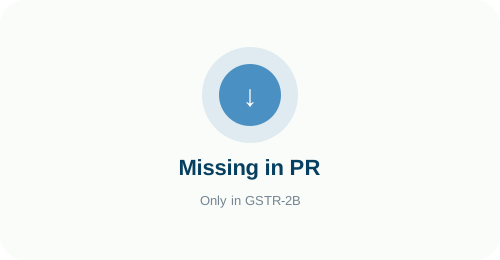
 The transaction is present in GSTR-2B but was not found in the Purchase Register. Example: INV-5001 from XYZ Traders is visible in 2B but not in the books.
 Missing in 2B
 The transaction exists in the Purchase Register but cannot be found in GSTR-2B. Example: INV-7001 is recorded in the books but not visible in 2B, so it may require supplier or GST follow-up.
The Summary Sheet Gives the Overall Reconciliation Status First
The generated reconciliation report begins with a Summary sheet so the user can understand the overall status without opening every detailed sheet first.
Conceptually, the Summary can show Total PR Entries, Total 2B Entries, Fully Matched, Partial Matched, Missing in PR and Missing in 2B . The values shown here are illustrative; actual values are calculated from the uploaded files.
The selected GSTIN and reconciliation period remain important context for interpreting the final report, while the detailed sheets remain available for invoice-level investigation.
Frequently Asked Questions
What is GST reconciliation software? +
GST reconciliation software compares business purchase records with GST-related data such as GSTR-2B and organizes matched, partially matched and missing transactions for review.
What is GSTR 2B reconciliation? +
GSTR 2B reconciliation compares the Purchase Register with GSTR-2B to identify fully matched transactions, differences and records missing from either source.
What is a GSTR reconciliation tool? +
A GSTR reconciliation tool automates repetitive comparison between internal purchase data and GST data so users can focus on exceptions instead of manually matching every row.
Can EdocSmart perform GSTR 2B reconciliation in Excel format? +
Yes. The workflow uses Purchase Register Excel and GSTR-2B Excel files, applies the configured GSTIN mapping and generates a consolidated reconciliation report.
What is the difference between GSTR 2B vs purchase register? +
The Purchase Register represents purchases recorded in the business books, while GSTR-2B represents GST-reported purchase and ITC-related transactions. Reconciliation compares the two views.
What is Purchase register vs GSTR 2B matching? +
It is the process of checking whether purchase invoices recorded internally are also available in GSTR-2B and whether the relevant fields correspond correctly.
How does ITC matching with GSTR 2B help? +
It helps users see which purchase transactions are represented in GSTR-2B and which exceptions may need further review before GST or ITC decisions.
Can multiple GST numbers be reconciled? +
Yes. Different GSTINs can be configured and reconciled separately, which is useful for businesses with multiple registrations and CA firms managing multiple clients.
Can different client Excel headers be mapped? +
Yes. Client-specific headers can be mapped to EdocSmart standard fields and saved for recurring use with that GSTIN or file format.
What does Fully Matched mean? +
Fully Matched means the corresponding transaction is present in both the Purchase Register and GSTR-2B and the relevant values satisfy the reconciliation rules.
What does Partial Match mean? +
A partial match means a transaction appears related in both sources, but one or more relevant matching fields contain a variation and should be reviewed.
What does Missing in PR mean? +
It means the transaction is present in GSTR-2B but was not found in the uploaded Purchase Register.
What does Missing in 2B mean? +
It means the transaction exists in the Purchase Register but was not found in GSTR-2B for the selected reconciliation context.
What is GSTR 2B matching software used for? +
GSTR 2B matching software is used to compare Purchase Register transactions with GSTR-2B, classify reconciliation outcomes and make exceptions easier to review.
Can this support GST 2B reconciliation in Tally Prime workflows? +
Yes. The reconciliation report can support teams that use Tally Prime by giving them a clear exception view before they take the required accounting or GST action in their existing process.
Does the reconciliation report include a Summary sheet? +
Yes. The Summary sheet provides an overall view of totals and reconciliation categories before the user opens detailed result sheets.
Is automated GST reconciliation only for large businesses? +
No. It is useful wherever repeated manual matching takes time, but the benefit becomes greater as invoice volume, client count or GSTIN count increases.
Does EdocSmart replace accountant review? +
No. The system automates repetitive comparison and classification while keeping final investigation, supplier follow-up and accounting decisions visible to the user.
Automate Your GSTR 2B Reconciliation with EdocSmart
Bring your Purchase Register and GSTR-2B into one controlled workflow, manage GSTIN-wise mappings, identify reconciliation exceptions faster and generate a report your accounting team can review.