Convert Bank Statements to Tally Instantly with EdocSmart Software: The Ultimate Guide for Indian Businesses and CAs
Every accountant and business owner in India knows the absolute dread of the first week of the month.
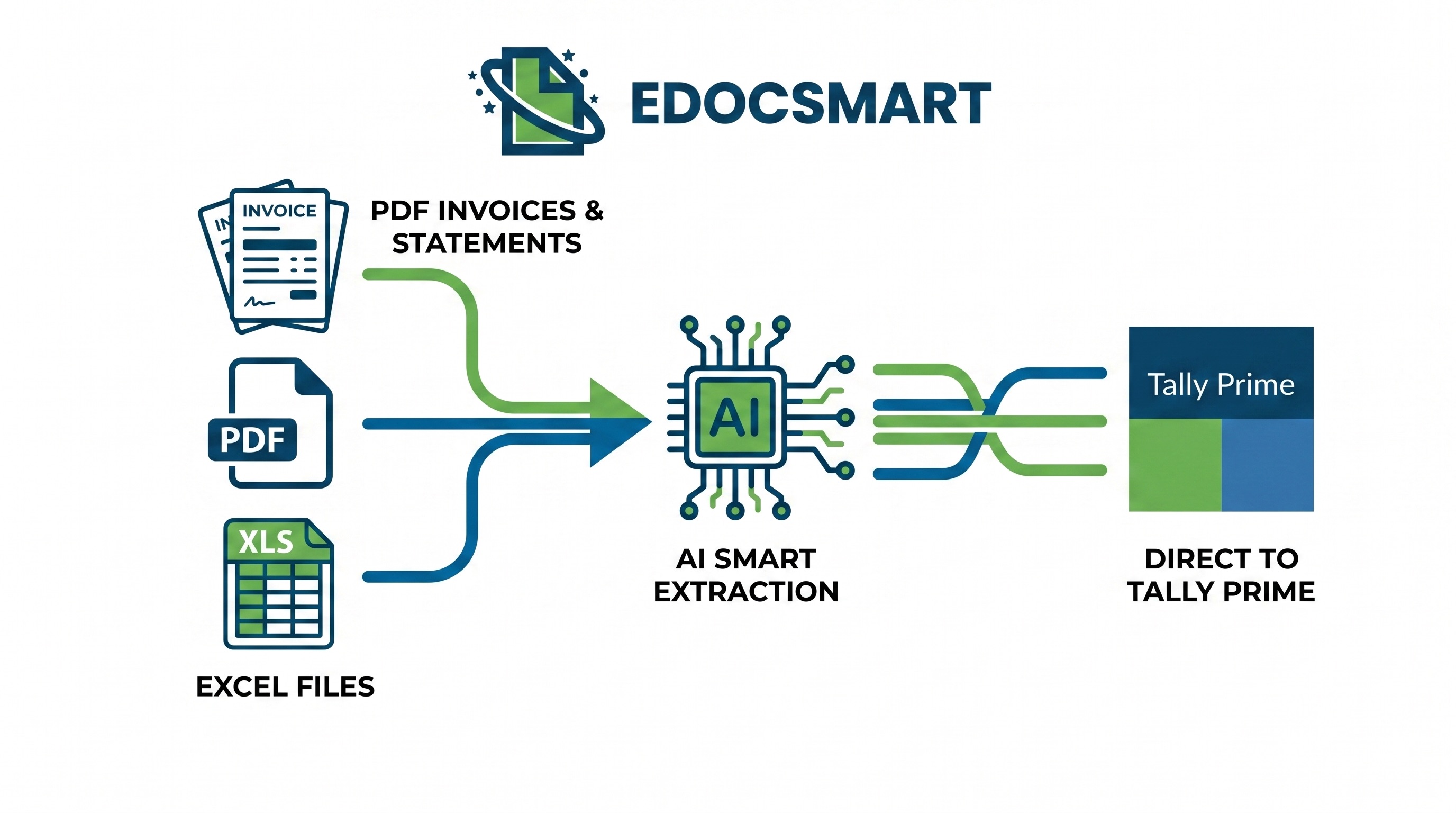
Every accountant and business owner in India knows the absolute dread of the first week of the month.
Your clients or your sales team send over a stack of PDF bank statements from HDFC, ICICI, SBI, or Axis Bank. Some statements are 5 pages long; others—especially for retail businesses or D2C brands with heavy UPI transactions—span over 100 pages.
Then begins the painful, eye-straining process of manually typing every single transaction into Tally. One debit entry, one credit entry, copying long, messy UPI or NEFT transaction narrations, and hoping you don’t make a single typo. If you miss even a single decimal point, your trial balance won’t match, your bank reconciliation goes out of window, and you end up spending hours locating that one elusive error.
If you are still doing this manually, you are losing valuable billable hours, burning out your staff, and delaying critical business decisions.
Fortunately, there is a better, faster, and 100% accurate way. With EdocSmart, you can completely automate this workflow and convert PDF bank statements to Tally instantly. Let us look at how you can transform your banking data entry from a multi-day headache into a simple, three-click process.
1. The Nightmare of Manual Bank Statement Entry in Tally
Let’s be honest. Nobody went to business school or cleared their CA exams to copy-paste data from a PDF statement into an accounting software. Yet, thousands of smart professionals spend their days performing manual bank statement entry in tally.
In the Indian business ecosystem, manual bank entry brings several major challenges:
- The UPI Explosion: Ever since UPI became the default payment mode in India, the number of bank transactions has skyrocketed. Instead of five major vendor bank transfers a week, businesses now have fifty daily micro-transactions of Rs. 100, Rs. 500, or Rs. 1000. Entering these one by one is an absolute nightmare.
- Messy and Long Narrations: A typical UPI, IMPS, or NEFT narration is filled with
random letters, transaction IDs, phone numbers, and bank reference numbers (e.g.,
UPI/314205892104/Direct Pay/Kotak). Manually typing or even copy-pasting these to maintain clear books is tedious and error-prone. - Month-End & GST Filing Rush: When the GST filing deadlines approach, you need your bank books updated immediately to verify your ITC (Input Tax Credit) and match payments. A delayed bank book means delayed reconciliations, leading to last-minute panic.
- Human Typing Errors: A simple typo—typing Rs. 54,900 instead of Rs. 45,900—can throw your entire tally bank reconciliation out of balance. Tracking down this error among thousands of entries feels like finding a needle in a haystack.
- The “Suspense Account” Dump: Because matching transactions manually takes too long, busy accountants often dump unidentifiable transactions into a “Suspense A/c,” promising to clean it up later. Months pass, the suspense ledger grows, and your financial reporting becomes highly inaccurate.
Accounting Reality Check: Manual bank data entry is not just slow; it is incredibly expensive when you calculate the cost of human resources spent on data entry instead of tax planning, business advisory, or strategic decision-making.
2. Why Indian Businesses Need Bank Statement to Tally Software
If you want to scale your business or your CA firm, automation is the only way forward. Implementing a dedicated tally bank transaction import solution offers immediate advantages:
Faster Accounting Operations
What used to take three working days can now be completed in under five minutes. By choosing to convert bank statement to tally with automated tools, you keep your books updated daily or weekly, rather than waiting for month-end.
100% Accuracy with OCR and AI
Modern accounting automation tools utilize advanced bank statement OCR software and AI bank statement extraction. This ensures that dates, transaction amounts, check numbers, instrument types, and narrations are pulled with absolute precision. There is zero risk of manual typing errors or transposing digits.
Faster Bank Reconciliation
When your bank entries are imported into Tally with correct dates, voucher types, and voucher numbers, tally bank reconciliation becomes a breeze. You no longer have to manually compare physical papers; Tally’s auto-reconciliation engine can match entries instantly because the source data is clean and accurate.
Better Employee Morale
Your junior accountants will thank you. By removing the soul-crushing task of manual data entry, they can focus on verifying ledgers, correcting tax mismatches, and handling client queries.
3. Manual Entry vs. Automated Bank Statement Import
Let us look at a direct head-to-head comparison to understand how shifting to an automated bank statement converter for tally can transform your office workflow:
| Feature / Aspect | Manual Entry Process | EdocSmart Automated Import |
|---|---|---|
| Average Time Taken (100 Transactions) | 2 to 3 hours of continuous typing | Less than 2 minutes |
| Data Accuracy | High risk of human error (omissions, typos) | 100% accurate data extraction via AI OCR |
| Narration Import | Abbreviated or incomplete to save time | Full, unaltered bank narrations imported |
| Ledger Mapping | Manual lookup for each transaction | Auto-remembers past mappings and suggestions |
| Handling Password-Protected PDFs | Must be manually opened, saved, or printed | Securely uploaded and decrypted within the app |
| Scalability | You must hire more staff as transactions grow | Scale infinitely without adding to your payroll |
| File Format Support | Hard copies or PDFs only | Multi-format support (PDF, Excel, CSV) |
4. What is EdocSmart?
EdocSmart is a highly specialized, AI-powered document processing and accounting automation platform. It is custom-built for Chartered Accountants, tax practitioners, small-and-medium enterprises (SMEs), and corporate finance teams in India.
Unlike generic conversion tools that struggle with complex Indian bank statement layouts, EdocSmart has been trained specifically on the unique statement designs of public, private, and co-operative banks in India.
Whether you need a pdf to tally software or a robust excel to tally software, EdocSmart handles everything effortlessly. It bridges the gap between your raw bank statements and your Tally Prime or Tally ERP 9 software, making bank statement automation software accessible to everyone without complex configurations.
5. Key Features of EdocSmart Bank Statement Automation
EdocSmart is packed with features designed to solve the real-world, practical problems faced by Indian accountants. Let’s break down its core capabilities:
AI-Powered Bank Statement Extraction
No two Indian banks share the same statement format. An SBI statement looks entirely different from an HDFC or an ICICI bank statement. EdocSmart uses intelligent AI bank statement extraction that automatically detects the bank, locates the transaction table, and extracts the Date, Narration, Chq/Ref No, Withdrawals (Debit), Deposits (Credit), and Balance columns with absolute precision.
Dual Support: PDF & Excel Bank Statement to Tally
Many banks allow you to download statements in both PDF and Excel formats. EdocSmart supports both: * pdf bank statement to tally: Simply upload your original, locked, or scanned PDF statement. * excel bank statement to tally: Directly upload your Excel or CSV files without spending hours clean-formatting the rows, deleting header text, or adjusting columns.
Handling Password-Protected Files
Most bank statements emailed to customers are protected by passwords (e.g., your PAN card number or customer ID). EdocSmart allows you to enter the password during upload, decrypting the file securely on the fly so you don’t have to manually unlock it beforehand.
Smart Ledger Mapping (Memory Engine)
This is where the magic happens. When you run a tally bank statement import, the software needs to know which Tally ledger to assign to each bank transaction. EdocSmart features a smart mapping engine. Once you map a narration (for example, mapping “Mata Trading Co” to the Sundry Creditors ledger “Mata Trading Company”), EdocSmart remembers this rule. The next time a transaction with a similar narration appears, it automatically maps it for you.
Seamless Tally Prime & Tally ERP 9 Integration
Whether your business has migrated to Tally Prime or is still comfortably running on Tally ERP 9, EdocSmart works flawlessly with both versions. It converts your statements into Tally-compatible XML formats or syncs directly through a local Tally connector utility.
Bulk Upload and Multi-Bank Handling
If you are managing accounts for multiple clients or have several current accounts, CC accounts, and OD accounts for a single business, you can upload them in bulk. EdocSmart processes them in parallel, saving you precious time.
6. Step-by-Step Guide: Convert Bank Statements to Tally Using EdocSmart
To show you how simple and practical this tool is, let’s walk through the entire step-by-step process of importing bank transactions into tally using EdocSmart.
+---------------------------+ | Step 1: Upload Statement | —> PDF, Excel, or CSV formats +---------------------------+ | v +---------------------------+ | Step 2: AI OCR Extraction | —> Automated data cleaning & processing +---------------------------+ | v +---------------------------+ | Step 3: Ledger Mapping | —> Auto-detect and suggest party names +---------------------------+ | v +---------------------------+ | Step 4: Tally Import | —> Click import & sync via local connector +---------------------------+
Step 1: Upload Your PDF or Excel Bank Statement
Log in to your EdocSmart dashboard. Choose the bank statement upload section. Drag and drop your statement—whether it is an HDFC, ICICI, SBI, Axis, Kotak, or Yes Bank statement. If the PDF is password-protected, simply type the password in the prompt box and click upload.
Step 2: AI Automatically Extracts the Transactions
Within seconds, the AI engine processes your document. It strips away all the unnecessary headers, footers, bank logos, branch details, and advertisement banners, leaving you with a clean, tabular view of your transactions.
Step 3: Review and Smart-Map Your Ledgers
EdocSmart will display the extracted transactions on your screen. * Receipt entries (Credits): Map them to your Sundry Debtors, sales accounts, or direct income ledgers. * Payment entries (Debits): Map them to your Sundry Creditors, expense ledgers (like rent, electricity, or travelling), or tax payment ledgers. * Bank Charges / Interest: Quickly map bank charges directly to the “Bank Charges” indirect expense ledger.
The smart search bar lets you look up your existing Tally ledgers in real-time. If a ledger doesn’t exist, you can even flag it for quick creation.
Step 4: Open the EdocSmart Tally Connector
Launch Tally on your computer and open the specific company ledger where you want to import these entries. Open the lightweight EdocSmart Tally Connector utility. This connector acts as a secure local bridge between the cloud platform and your offline Tally software.
Step 5: One-Click Sync and Verify
Click the “Import to Tally” button. Watch as hundreds of transactions—including complex UPI entries, NEFT/RTGS transfers, salary payouts, and bank charges—are instantly posted into Tally as proper Contra, Payment, or Receipt vouchers.
Open Tally, go to the Day Book, and check your work. Every transaction is there with its exact date, correct ledger, proper voucher type, and complete narration.
Pro Tip: Because the import creates genuine native Tally vouchers, your bank reconciliation in tally is automatically half-done. Simply run Tally’s banking utility to complete the matching in seconds!
7. Streamlining GST, Purchase Bills, and Payment Entries in Tally
As an accountant in India, you are not just entering bank transactions in isolation. Every bank debit or credit is deeply linked to an invoice, a purchase bill, or a tax liability.
Using EdocSmart as part of your tech stack allows you to seamlessly tie your bank transactions with your core GST and invoice entries.
Matching Bank Entries with Purchase Bills
When you pay a supplier, you need to match that bank debit transaction with a pre-existing purchase bill. If you have already processed your purchase bill entry in tally with gst or created a purchase invoice entry in tally prime, importing your bank statement through EdocSmart makes matching these payments incredibly fast. You can quickly map the payment voucher to the respective Sundry Creditor ledger, preventing unadjusted outstanding balances.
If you are dealing with smaller vendors or out-of-pocket expenses where you don’t have structured bills, you can use the bank statement import to instantly post the payment voucher and later complete the without gst bill entry in tally prime or create a rent gst bill entry in tally prime for regular monthly office rentals.
Automating GST Payments and Reverse Charge (RCM)
When you make online tax payments, you need to record the transaction correctly. After importing your tax payment from the bank statement, you can instantly select the appropriate ledger and specify what is the gst payment entry in tally. This keeps your GST liability ledgers perfectly matched with your electronic cash ledger on the GST portal.
   [Bank Debit Entry (via EdocSmart)]
                  │
     ┌────────────┴────────────┐
     ▼                         ▼
[GST Tax Payment] [Supplier Payment] │ │ ▼ ▼ [What is the GST [Match with Purchase Invoice Payment Entry in Tally] Entry in Tally Prime]
Best GST Software for CA Firms
For Chartered Accountants managing compliance for multiple clients, EdocSmart acts as a powerful companion tool. While you use the best gst software for ca to file GSTR-1 and GSTR-3B and download GSTR-2B data, EdocSmart handles the ground-level data entry—transforming purchase bill entry in tally erp 9 or tally prime, and aligning bank entries, so your reconciliation data is always fresh, clean, and audit-ready.
8. Supported Indian Banks and File Formats
EdocSmart is designed to be highly versatile. It supports almost every major public, private, foreign, and cooperative bank operating in India. Below is a quick overview of the supported banks and typical source file types:
| Bank Category | Supported Banks | Supported Formats |
|---|---|---|
| Major Private Banks | HDFC Bank, ICICI Bank, Axis Bank, Kotak Mahindra Bank, IndusInd Bank, Yes Bank, IDFC First Bank | PDF (Scanned/Digital), XLS, XLSX, CSV |
| Major Public Sector Banks | State Bank of India (SBI), Punjab National Bank (PNB), Bank of Baroda (BoB), Canara Bank, Union Bank of India | PDF, Excel, Text format statements |
| Co-operative & Gramin Banks | Saraswat Bank, Cosmos Bank, SVC Bank, local state co-operative banks | Standard PDF statements, clean CSV files |
| Foreign & Corporate Accounts | HSBC, Citibank, Standard Chartered, Deutsche Bank, Barclays | Custom multi-column corporate statements, MT940 format |
No matter how complex your bank’s statement layout is, EdocSmart’s advanced bank statement OCR software processes it accurately.
9. Who Benefits the Most from EdocSmart?
EdocSmart is not a single-size utility tool; it is a highly scalable solution designed for different stakeholders in the business ecosystem:
1. Chartered Accountants & CA Firms
CA firms in India manage dozens, if not hundreds, of clients. Client data often arrives late, especially during tax audit season (September/October) and March year-end. Using EdocSmart as a core CA automation software India allows junior articles and staff members to finish months of backlog bookkeeping in a single afternoon. This allows your firm to take on more clients without hiring seasonal staff.
2. SMEs and Growing Businesses
Small and medium business owners often handle their own accounts or work with a single in-house accountant. EdocSmart saves precious time, allowing you to monitor daily cash flows, see exact outstanding payments, and make smarter business decisions without waiting weeks for the accountant to write up the books.
3. Retailers, Distributors, and E-commerce Merchants
If you run a retail shop, a wholesale distribution network, or an online store on Amazon, Flipkart, or Shopify, you likely deal with hundreds of daily UPI payments, COD payouts, and bank charges. Doing this manually is practically impossible. EdocSmart makes this massive volume of entries manageable with its bulk import features.
4. Shared Service Centers and Bookkeeping Agencies
For outsourced bookkeeping agencies, efficiency equals profitability. The faster you can clean, process, and import client bank statements, the higher your margins. EdocSmart serves as your core processing engine, minimizing manual labor.
10. Real-World Case Study: How an Indian CA Firm Saved 80% Automation Time
Let’s look at a practical, real-world scenario to understand how EdocSmart works in the real world.
The Client Profile
- Firm Name: K.R. Associates (Chartered Accountants, Ahmedabad)
- Staff Size: 8 Article Assistants, 2 Senior Accountants
- Client Base: 120+ active retail, trading, and manufacturing clients
- Core Challenge: During GST filing season (between the 1st and 11th of every month) and tax audit months, the office was consistently overloaded. Clients would send massive PDF bank statements of current and CC accounts. Staff members spent up to 12 hours a day simply entering bank lines into Tally.
The EdocSmart Intervention
K.R. Associates decided to implement EdocSmart across all accounting terminals. They installed the secure local Tally Connector and trained their articles for 30 minutes on how to upload statements and map ledgers.
The Results
For one of their largest clients—a regional distributor of consumer goods with over 1,500 monthly transactions spanning HDFC and SBI current accounts:
- Before EdocSmart: It took a junior article assistant roughly 1.5 working days to manually input, verify, and reconcile the bank entries for this single client.
- After EdocSmart: The PDF statement was uploaded to EdocSmart, the AI mapped 90% of the recurring vendor names instantly, and the remaining 10% were mapped manually. The entire batch of 1,500 entries was synced into Tally Prime in under 15 minutes.
- The Business Impact: K.R. Associates reduced their average bookkeeping turnaround time by over 80%. The firm cleared its month-end backlog three days before the GST deadlines, completely eliminating staff burnout and avoiding late-filing penalties for their clients.
Partner Testimonial: “We used to dread the first week of the month. Our staff spent all their energy doing manual data entry. With EdocSmart, the data entry is over in a flash. Our junior articles are now actually learning tax audit work, and our clients get their financial reports on time.” — CA Rajesh Patel, Senior Partner
11. Frequently Asked Questions (FAQs)
Does EdocSmart support Tally Prime as well as older Tally versions?
Can I import highly scanned, faded, or photo-copied PDF statements?
How does EdocSmart handle password-protected bank statements?
My bank statement contains thousands of UPI entries. Can EdocSmart process them in one go?
Is ledger mapping a manual process every single time?
Is my financial data safe with EdocSmart?
Can I also import Excel files that I have manually created or customized?
Does it support both receipt and payment voucher types in Tally?
12. Conclusion & Next Steps
Manual bookkeeping is a relic of the past. As Indian businesses grow rapidly and transactions multiply through UPI and digital channels, continuing to manually enter bank statements in Tally is holding your business back.
By shifting your workflow to EdocSmart, you can: * Eliminate typing errors and trial balance mismatches. * Save up to 80% of bookkeeping time. * Ensure that your bank statement to tally process is completed instantly. * Empower your accounting team to focus on high-value advisory, tax planning, and strategic business growth.
Stop wasting valuable hours staring at bank statements and typing out long narrations. Experience the power of modern tally accounting automation today.
Ready to Automate Your Bookkeeping?
Take the first step toward a stress-free accounting season. Check out our affordable subscription models tailored for CAs, SMEs, and enterprise finance teams.
👉 Explore EdocSmart Pricing and Features
Reduce repetitive accounting work
Explore a practical EDOCSMART workflow for faster, structured accounting automation.
Explore EDOCSMART