How to Convert PDF Bank Statements, Invoices & Excel Files Directly into Tally with EdocSmart
If you walk into any Indian business office or a Chartered Accountant’s cabin during the first week of any month—or worse, during the tax audit season you will see the same scene.
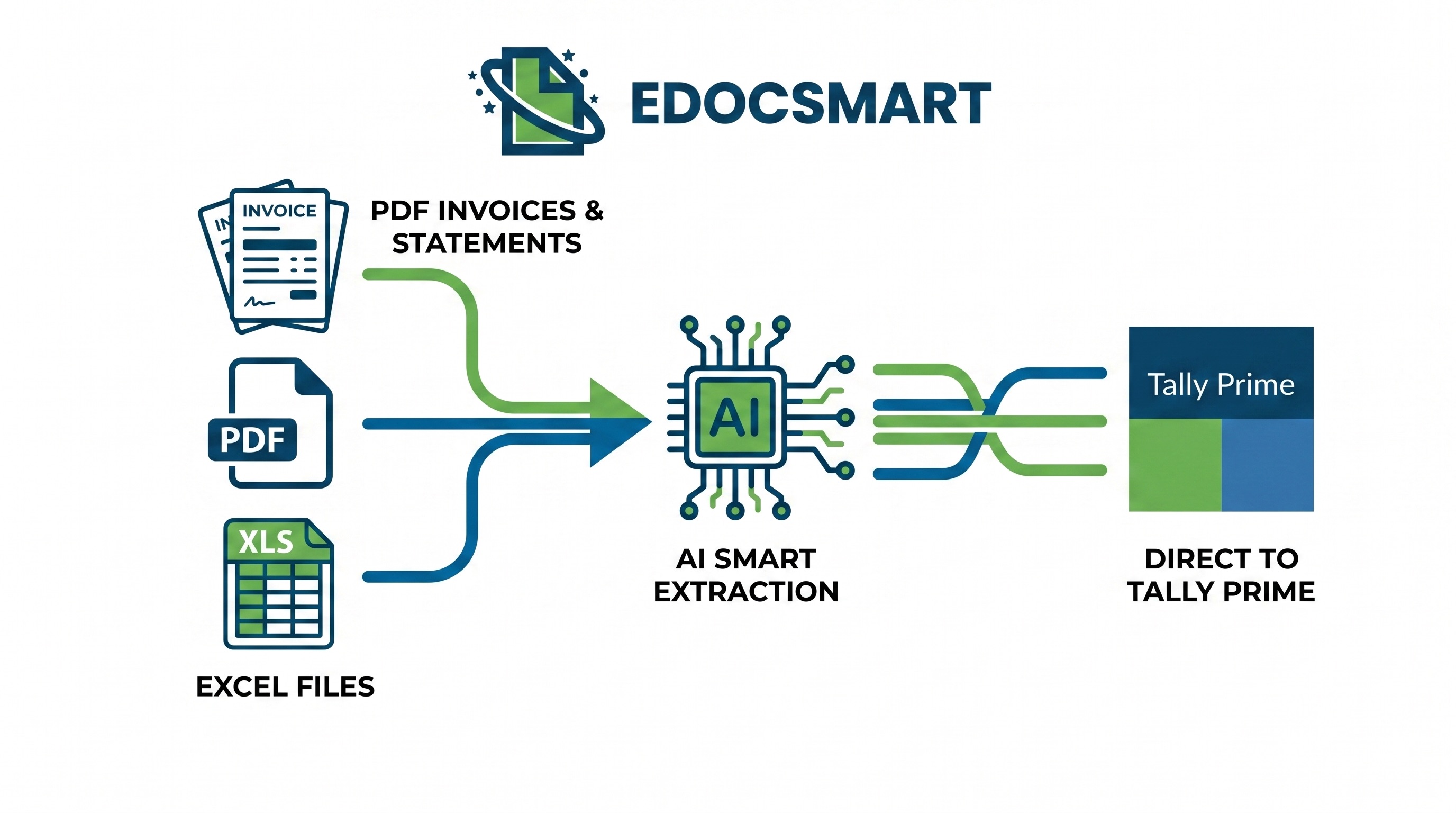
If you walk into any Indian business office or a Chartered Accountant’s cabin during the first week of any month—or worse, during the tax audit season you will see the same scene.
Desks are piled high with printouts of vendor invoices, stacks of bank statements from HDFC, ICICI, or SBI, and pendrives loaded with messy Excel sheets. Someone is sitting there, squinting at a PDF on one screen, and typing furiously into Tally on another.
They are doing the classic gst invoice entry in tally prime manually, line by line, voucher by voucher.
Let’s be honest. Nobody went to business school or cleared the tough CA exams just to spend eight hours a day doing data entry. It is slow, boring, and highly prone to typing errors. One wrong decimal point in a purchase invoice entry in tally prime can throw off your entire GSTR-2B reconciliation, leading to missed Input Tax Credit (ITC) or an avoidable tax notice from the GST department.
What if you could skip the manual typing altogether? What if you could take a multi-page PDF bank statement (even a password-protected one), a heap of purchase bills, or a complex Excel ledger, and push them directly into Tally in a matter of seconds?
That is exactly what we are discussing today. In this comprehensive guide, we will show you how to use EdocSmart to completely automate your data entry, save hundreds of hours, and ensure your bookkeeping is 100% accurate.
The Real Nightmare of Manual Tally Entry for Indian Businesses
If you run a business in India, you already know that our tax and accounting compliance is highly detail-oriented. Between CGST, SGST, IGST, TCS, TDS, and e-way bills, every single entry in Tally has to be perfect.
Let’s look at the actual problems accountants and business owners face every single day with manual entry:
- The Purchase Ledger Bottleneck: Every time a vendor sends a PDF invoice, your team has to manually type out the ledger details. Doing a purchase invoice entry in tally erp 9 or Tally Prime requires matching the item names, quantities, rates, and tax slabs. If you have an invoice with 50 different line items, this single task can take up to an hour.
- Bank Reconciliation Delays: Your bank statement has hundreds of entries—UPI payments, NEFTs, bank charges, and cash deposits. Manually posting these transactions into Tally is incredibly tedious. If you miss even one transaction, your bank balance won’t match, and you’ll spend hours searching for the error.
- GSTR-2B Mismatch and Lost ITC: If your staff makes a typo while entering a GSTIN or invoice amount during a purchase bill entry in tally with gst, that invoice won’t match your GSTR-2B. When the data doesn’t match, you cannot claim your Input Tax Credit (ITC). For a growing business, this is a direct cash-flow loss.
- Overworked Teams and March-Ending Stress: During tax deadlines, accounting teams are forced to work late into the night. When people are tired, they make mistakes. This creates a stressful loop of errors, corrections, and delayed filings.
Manual Data Entry Loop: [Receive PDF Invoice] -> [Manually Type into Tally] -> [Typing Mistake Happens] -> [GST Mismatch in GSTR-2B] -> [Loss of ITC / Tax Notice] -> [Frantic Manual Verification]
To break this loop, we need a smart, automated bridge that reads these PDFs and Excel files and types them into Tally with absolute accuracy. This is where automated data extraction becomes essential.
Why Businesses Need to Convert PDF Data Directly into Tally
In an ideal world, every business would use an interconnected system where digital invoices flow seamlessly from one system to another. But in the real world, you receive documents in different formats: * Vendor bills as PDFs (often scanned copies or mobile photos). * Bank statements as password-secured PDFs. * Sales summaries or purchase registers as Excel sheets.
Manually processing these documents is a massive waste of human talent. Here is why modern businesses and CA firms are moving toward direct PDF-to-Tally conversion:
| The Old Way (Manual Entry) | The New Way (Automated Conversion) |
|---|---|
| Takes 10 to 15 minutes per invoice. | Takes less than 10 seconds per invoice. |
| High chance of typing errors in GSTIN and tax amounts. | Zero manual errors; data is extracted directly from the source PDF. |
| Hard to manage multi-page bills with dozens of line items. | Multi-line items are processed instantly without any extra effort. |
| Bank reconciliation takes days at the end of the month. | Daily or weekly bank reconciliation takes just a few clicks. |
| High staff turnover due to repetitive, boring work. | High staff satisfaction; team focuses on analysis and tax planning. |
By automating your gst bill entry in tally prime, you are not just saving time—you are protecting your business from compliance risks and freeing up your accounting team to focus on business growth.
What is EdocSmart?
EdocSmart is an intelligent, AI-powered document processing software designed specifically to solve the data-entry challenges faced by Indian businesses, accountants, and Chartered Accountants.
Unlike basic OCR (Optical Character Recognition) tools that often fail when invoice formats change, EdocSmart uses advanced AI to understand the context of the document.
Whether your vendor uses a highly customized invoice design, or you are trying to read a 100-page bank statement, EdocSmart identifies the key data points—such as GSTIN, invoice date, taxable value, CGST, SGST, IGST, round-off, and grand total—and formats them perfectly for Tally.
It acts as a secure, smart bridge between your unstructured files (PDFs, scans, Excel files) and your Tally ERP 9 or Tally Prime system.
Key Features of EdocSmart: Built for Indian Accounting Workflows
What makes EdocSmart different from generic document readers is its deep integration with Indian business workflows. Here are its standout features:
1. Template-Free AI Extraction
Most old-school OCR tools require you to create a “template” for every new vendor. If the vendor shifts their logo or changes their invoice layout even slightly, the template breaks. EdocSmart does not need templates. Its AI automatically reads the document, locates the items, tax rates, and totals, and extracts them instantly.
2. Full Support for Password-Protected Bank Statements
Almost all official bank statements sent by banks like SBI, HDFC, ICICI, or Axis are password-protected. EdocSmart allows you to securely input the password, decrypt the statement, and extract every single transaction line without needing to manually copy-paste or use unsecured online PDF unlockers.
3. Smart Ledger Mapping
Your vendor might write “CGST 9%” on their invoice, but your ledger in Tally might be named “CGST @ 18% Input”. EdocSmart remembers your preferences and maps the incoming data directly to your existing Tally ledgers. You don’t have to rename your ledgers to match the software.
4. Multi-Page and Multi-Line Item Processing
If you work in sectors like pharmaceuticals, FMCG, retail, or hardware distribution, your invoices will often have dozens of line items with different GST rates. EdocSmart processes multi-page documents effortlessly, grouping items by their respective GST rates so your purchase bill entry in tally gst pdf matches your tax requirements perfectly.
5. Seamless Local Tally Connector
You do not need to upload your Tally data to the cloud. EdocSmart provides a secure local Tally Connector that runs on your computer, allowing you to sync your extracted data directly into your local Tally company file in real time.
Step-by-Step Guide: How to Convert PDF to Tally Using EdocSmart
Now, let’s look at how easy it is to automate your accounting workflow. Here is the step-by-step process of converting your PDF bank statements, invoices, or Excel sheets into Tally.
[Upload PDF/Excel to EdocSmart] │ ▼ [AI Extracts Data Automatically] │ ▼ [Map & Review Ledgers in Connector] │ ▼ [One-Click Push to Tally Prime / ERP 9]
Step 1: Open EdocSmart and Upload Your Files
Log in to your EdocSmart dashboard. Select the module based on what you want to import—Invoices, Bank Statements, or Excel Files. You can drag and drop multiple PDF files at once.
If you are uploading bank statements, you can upload them even if they are password-protected. Simply enter the password when prompted, and the tool will safely decrypt and open the file.
Step 2: Let the AI Read and Extract Your Data
Once uploaded, EdocSmart’s AI gets to work. Within seconds, it scans the document and extracts key information: * For Invoices: Invoice Number, Date, Supplier Name, GSTIN, Line Items, Taxable Value, GST Amounts (CGST, SGST, IGST), Round-off, and Grand Total. * For Bank Statements: Transaction Date, Description/Narration, Reference Number, Debit, Credit, and Balance. * For Excel Files: Column headers are instantly identified and prepared for mapping.
Step 3: Open the EdocSmart Tally Connector
Launch the secure EdocSmart Tally Connector on your computer. Make sure your Tally Prime or Tally ERP 9 is open and the correct company file is loaded. The connector will automatically establish a secure local connection with Tally.
Step 4: Review and Map Entries Before Import
Before pushing the data into Tally, you have full control to review the extracted information. * Ledger Matching: The connector will automatically match the vendor name from the PDF with your Tally Sundry Creditors ledger. If it’s a new vendor, you can create the ledger directly from the connector interface. * Tax Mapping: Match the extracted GST tax amounts to your designated Tally tax ledgers (such as Input CGST, Output SGST, etc.). * Category Matching: For bank entries, map specific recurring narrations (like “Bank Charges” or “Rent Payment”) to their respective expense ledgers.
Step 5: One-Click Sync into Tally
Once you are satisfied with the preview, click “Import”. Within seconds, the connector will securely push all the transactions into Tally. Open your Tally screen, and you will see all your purchase, sales, payment, or receipt vouchers created perfectly, complete with item details, tax calculations, and narration notes.
Pro Tip: Keep your Tally open on a split screen while importing. You can literally watch your vouchers appear in Tally in real-time as the connector syncs them.
Deep Dive: Handling Different Invoice Types and Vouchers in Tally
Every business deals with different kinds of financial entries. To make sure you understand how EdocSmart handles these, let’s look at a few common scenarios that accountants handle daily.
1. Purchase Bill Entry in Tally with GST
When you get a regular tax invoice from a registered vendor, you need to book it correctly to claim ITC. Here is how EdocSmart simplifies this: * It extracts the vendor’s GSTIN and matches it with your Tally masters. * It identifies the items, their HSN codes, and individual tax rates (5%, 12%, 18%, 28%). * It creates a structured purchase voucher, matching the physical paper invoice exactly.
This means you no longer need to spend hours wondering how to do purchase invoice entry in tally prime for complex, multi-item transactions.
2. Rent GST Bill Entry in Tally Prime
Service invoices like rent, internet bills, or professional fees are handled slightly differently than product invoices. * When you process a rent gst bill entry in tally prime, you usually debit an expense ledger (like “Office Rent Expense”) instead of stock items. * EdocSmart allows you to map these PDF service bills to accounting invoice mode in Tally. * It ensures that the CGST/SGST on rent is posted to the correct expense ledger, allowing you to easily claim your ITC on business overheads.
3. Without GST Bill Entry in Tally Prime
Not every purchase contains GST. You might buy items from unregistered dealers, or purchase exempt goods. * Doing a without gst bill entry in tally prime is easy with EdocSmart. * The AI recognizes when an invoice has zero tax values. * It creates a clean purchase voucher without applying GST ledgers, keeping your tax books clean and ensuring unregistered purchases don’t get mixed up with taxable ones.
4. What is the GST Payment Entry in Tally?
At the end of the month, once you offset your Input Tax Credit against your Output Liability, you pay the remaining GST balance to the government. * To record this, you need to make a GST payment entry. * Using EdocSmart, you can upload the PDF bank statement showing the tax payment transaction, or upload the PMT-06 GST challan receipt. * The system reads the transaction and maps it as a gst payment entry in tally, debiting your GST liability ledgers and crediting your bank ledger. This keeps your government tax ledger and bank balances in perfect sync.
Case Study: How a Delhi-Based Distributor Saved 15 Days Every Month
Let’s look at a real-world example of how automation changes daily business operations in India.
The Business Profile
Vikas Electronics & Distributors is a busy consumer electronics distributor based in Nehru Place, Delhi. They distribute products to over 400 retail shops across North India.
The Challenges
- High Invoice Volume: They receive over 1,500 purchase bills every month from major brands like Samsung, LG, and Xiaomi. These invoices are highly complex, often featuring 30 to 50 items per bill with varying tax rates and promotional discounts.
- Wasted Time: Two full-time junior accountants spent almost all their time doing manual purchase invoice entry in tally erp 9 and matching physical bills.
- Tax Filing Stress: During GST filing periods (between the 11th and 20th of every month), the office was highly stressed. Typing errors led to differences in GSTR-2B, which blocked thousands of Rupees in ITC every single month.
- Bank Reconciliation Backlog: Their bank statement was over 80 pages long each month, filled with UPI, RTGS, and cheque transactions that often went unposted for weeks.
The Solution: Switching to EdocSmart
In late 2023, the management team integrated EdocSmart into their accounting workflow.
Instead of typing invoices manually, the team began saving all incoming vendor PDFs into a shared digital folder and uploading them to EdocSmart in bulk.
Old Manual Process: 1,500 Invoices x 15 Minutes = 375 Hours of Manual Labor / Month (Highly prone to typos)
With EdocSmart: 1,500 Invoices x 10 Seconds = 4.1 Hours of Automated Review / Month (Zero manual typos)
The Results
The transformation was immediate: * Massive Time Savings: The time required to process purchase bills dropped by over 90%. What used to take two people an entire month now takes less than two days of light review. * Flawless GSTR-2B Matching: Because EdocSmart extracts data directly from the vendor’s PDF, invoice numbers, dates, and tax values match perfectly. Their ITC mismatches dropped to zero. * Instant Bank Reconciliation: The team now uploads their password-protected HDFC bank statement weekly. EdocSmart automatically extracts the entries, matches them with customer ledgers, and posts them in Tally within minutes. * Resource Reallocation: The two junior accountants were freed from manual entry and reassigned to customer payment follow-ups and inventory analysis, helping the business recover outstanding payments much faster.
Why EdocSmart is the Best GST Software for CA Firms and SMEs
If you run a Chartered Accountancy (CA) firm or a tax consulting business in India, your profitability depends entirely on your efficiency.
During tax season, your team is likely overwhelmed with client documents. Clients often hand over shoeboxes of physical bills, chaotic Excel registers, and password-protected bank PDFs at the very last minute.
This is why top practitioners consider EdocSmart the best gst software for ca firms and busy tax offices:
1. Multi-Client Company Management
The EdocSmart interface allows you to create separate profiles for each of your clients. You can easily switch between Client A (a pharmacy), Client B (a manufacturer), and Client C (a service provider) without mixing up their ledgers or files.
2. High Return on Investment (ROI)
By automating data entry, a single accountant at your firm can manage three to four times more clients than before. This allows you to scale your practice and increase your revenue without needing to hire a large team.
3. Fewer Audit Corrections
Manual typos during tax entry can lead to significant audit issues later on. By using AI-driven extraction, you ensure that the financial books you audit match the source documents perfectly, reducing the risk of clerical errors.
4. Simple, Fast Onboarding
You don’t need to spend weeks training your staff on how to use EdocSmart. If they know how to drag and drop a file and click “Import”, they can use EdocSmart. The interface is clean, intuitive, and designed to match the natural flow of accounting work.
Supported Documents
EdocSmart is highly versatile and supports a wide range of document types, formats, and sources commonly used in Indian business operations:
| Document Category | Supported Formats | Common Examples |
|---|---|---|
| Bank Statements | Secure PDFs (including password-protected files), Excel, CSV | SBI, HDFC, ICICI, Axis, PNB, Kotak Mahindra, etc. |
| Vendor Invoices | Digital PDFs, high-quality scans, images, Excel sheets | Product invoices, service bills, logistics bills, import/export bills |
| Sales Invoices | Bulk PDF files, custom billing software exports | Retail bills, e-commerce sales reports, distribution invoices |
| Accounting Registers | Excel, CSV, text formats | Sales registers, purchase books, custom ledger exports from other ERPs |
Frequently Asked Questions (FAQs)
Does EdocSmart work with both Tally ERP 9 and Tally Prime?
How does the software handle password-protected bank statements?
What happens if a vendor invoice is slightly blurry or scanned?
My Tally is installed on my office computer, not the cloud. Can I still use EdocSmart?
Can the system process invoices with multiple GST rates?
Do I need to create templates for new vendors?
Can I review and modify the data before it gets imported into Tally?
Is my business and financial data safe with EdocSmart?
Conclusion: The Smart Way to Run Your Finance Department
In today’s fast-paced business environment, speed and accuracy are crucial. Still spending your valuable time manually typing out purchase invoice entry in tally or copying bank statements line-by-line is like trying to run a modern business with pen and paper.
Manual data entry slows down your financial operations, frustrates your accounting team, and increases the risk of expensive tax compliance mistakes.
By adopting EdocSmart, you can completely automate your bookkeeping workflow. Whether you want to streamline your gst invoice entry in tally prime, easily process complex multi-item bills, or reconcile an entire month of bank statements in seconds, EdocSmart makes the process fast, simple, and stress-free.
Bring efficiency, precision, and ease to your finance department. Let your accounting team focus on what truly matters—strategic planning, tax optimization, and business growth.
Reduce repetitive accounting work
Explore a practical EDOCSMART workflow for faster, structured accounting automation.
Explore EDOCSMART