How to Automate Purchase Entries in Tally
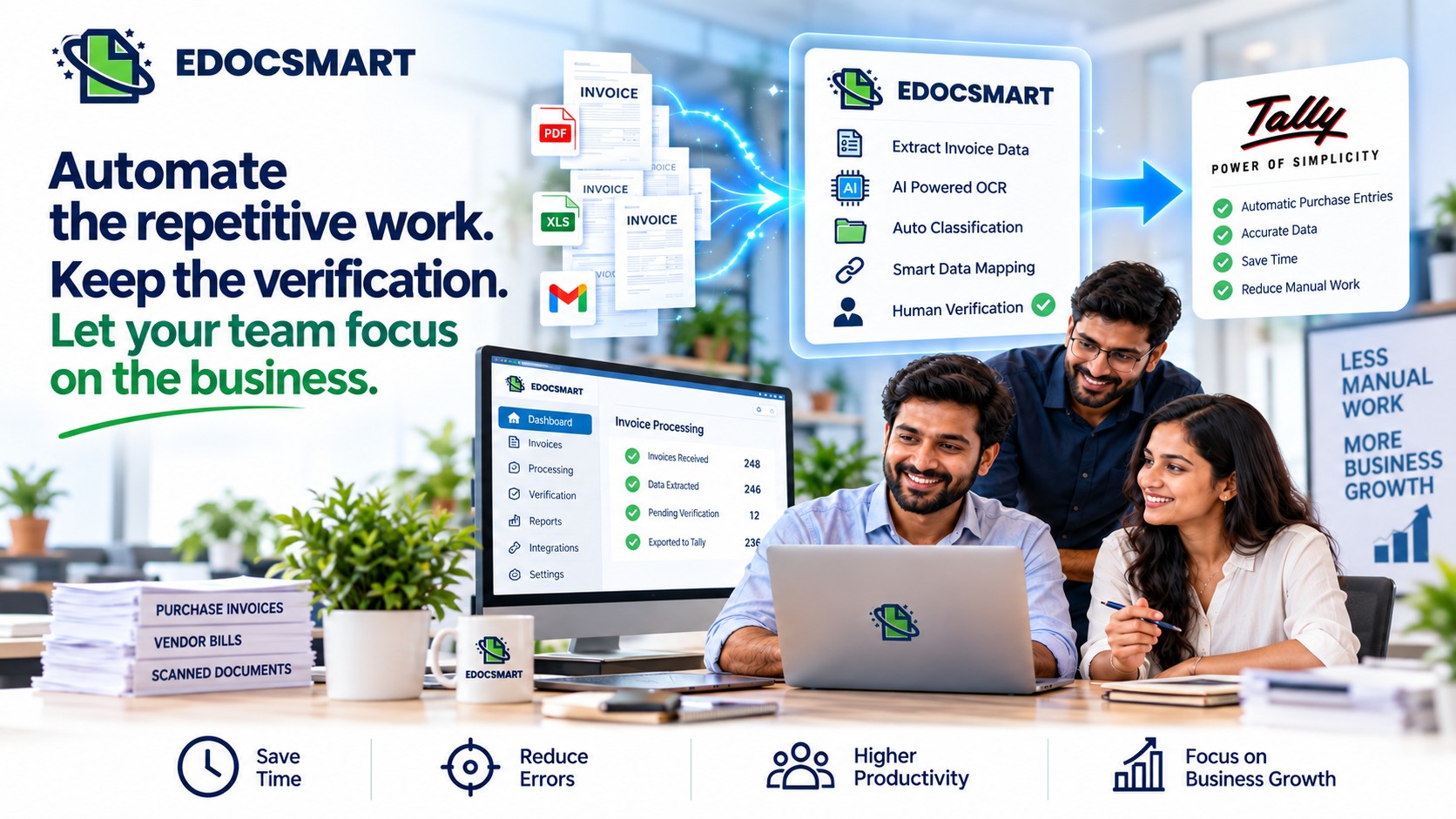
Move from repetitive invoice typing to a smarter workflow where invoice data is extracted, reviewed, approved, and synced to Tally with Edocsmart.

Running a startup often means doing a little bit of everything.
One day, the owner is talking to a customer. The next day, they are checking inventory, following up with suppliers, reviewing payments, and sitting with the accounting team.
When the business is small, there may not be a separate person for every task.
The same person may handle accounts, operations, purchasing, and administration.
And sometimes, when there are too many invoices waiting to be entered into Tally, the owner themselves ends up sitting in front of the computer and doing data entry.
This is especially common with purchase invoices.
A supplier sends an invoice. Someone has to read it, enter the supplier details, create the party ledger if required, enter the purchased items, add HSN details, enter quantities and rates, check GST, and finally create the purchase voucher in Tally.
One invoice may not take very long.
But when there are dozens of invoices, those minutes quickly turn into hours.
So the question for a growing business is:
Can you automate purchase entries in Tally without completely removing the verification process?
Yes. With the right invoice automation for Tally, businesses can move from manually entering every purchase invoice to a workflow where invoices are scanned, data is extracted, verified, and then synced to Tally.
Why Purchase Entries Become a Problem for Small Businesses
For a large organization, accounting tasks may be handled by a dedicated finance team.
For a startup or small business, the situation is often different.
The team is smaller, responsibilities overlap, and everyone has to contribute wherever the workload is high.
Purchase invoices can become one of those recurring tasks.
A typical manual purchase-entry process may look like:
Invoice
received → Read invoice → Open Tally → Find/Create party ledger → Enter items →
Enter HSN → Enter quantity → Enter rate → Enter GST → Create purchase voucher →
Verify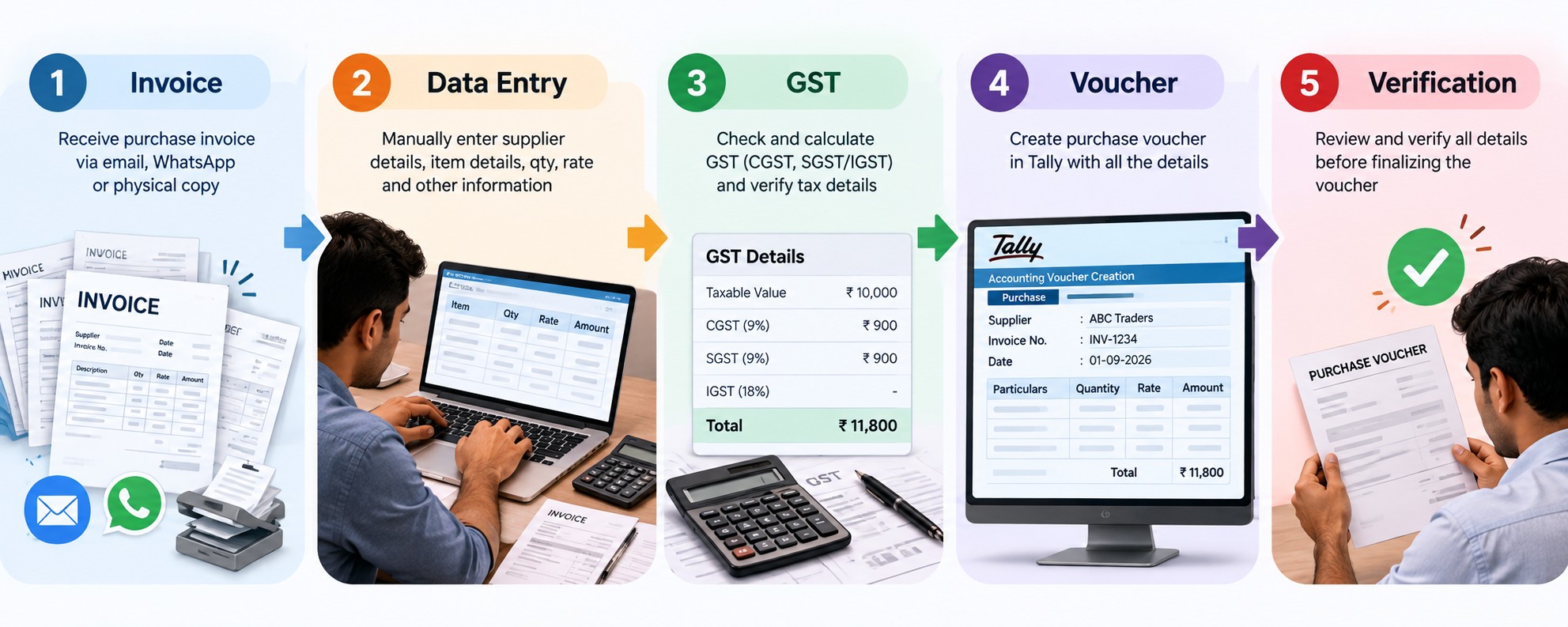
Now imagine repeating this process 20, 50, or 100 times.
The problem isn't only the time spent entering the data.
It also means that people who could be working on business operations are spending time performing repetitive accounting work.
For a
startup owner, this can become particularly frustrating because even after
running the business all day, there is still accounting data entry waiting to
be completed.
What Does It Mean to Automate Purchase Entries in Tally?
Automating purchase entries means reducing the amount of manual work required to convert a purchase invoice into a purchase entry in Tally.
Instead of manually reading every invoice and typing the information into Tally, an automated workflow can extract the invoice information first.
The user can then verify the extracted information before sending it to Tally.
The workflow becomes:
can/Upload Invoice → Extract Data → Verify → Sync to Tally
This is the basic idea behind Tally invoice automation.
The goal isn't simply to automate one step.
The goal is to reduce the repetitive work involved in the complete invoice-to-Tally process.
How AI Can Help Automate Purchase Entries in Tally
Modern invoice automation can use AI to understand the information available on an invoice.
An AI invoice scanner for Tally can process an invoice and identify information such as:
- Supplier name
- GST number
- Invoice number
- Invoice date
- Billing and shipping information
- Item names
- HSN codes
- Quantities
- Rates
- Tax information
- Total invoice value
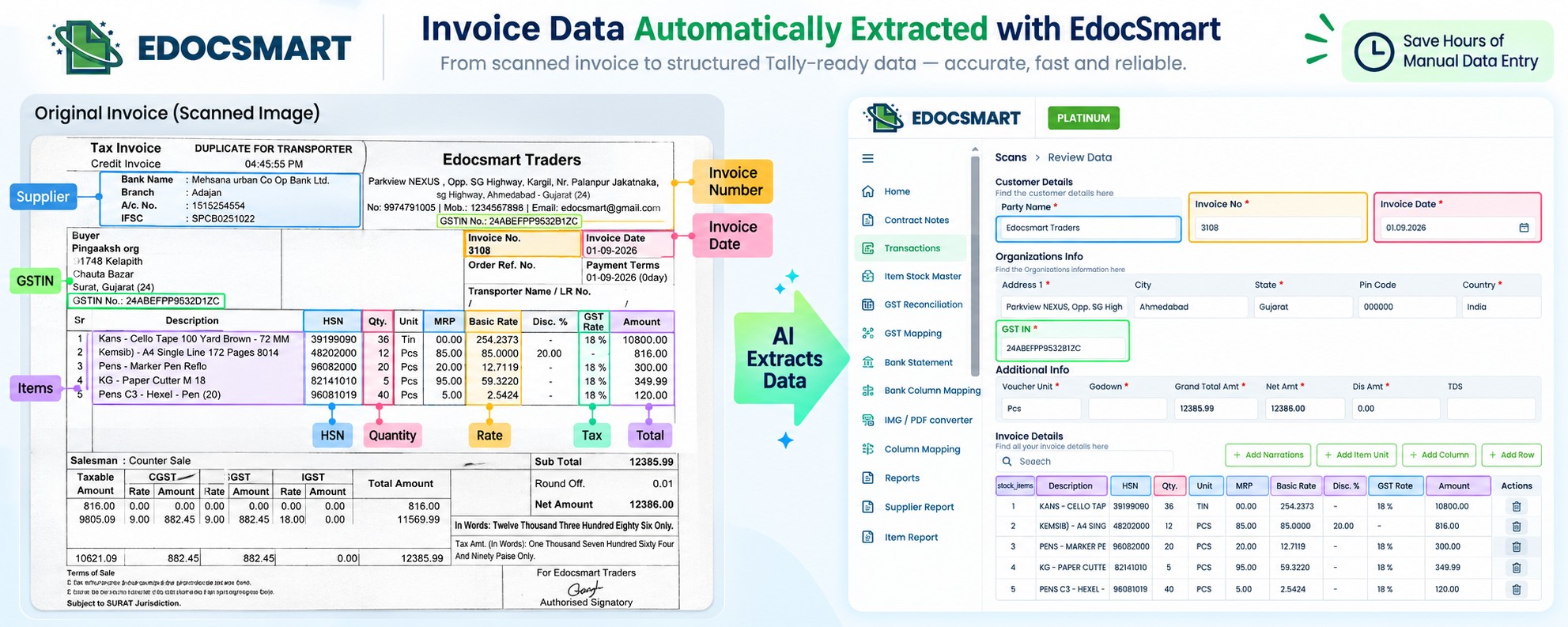
This is commonly referred to as AI invoice processing for Tally.
Instead of manually typing each field into Tally, the extracted information can be reviewed before it is transferred into the accounting system.
This changes the role of the person handling accounts.
They don't have to spend their entire time typing.
They can spend more time checking and approving the information.
How EdocSmart Automates the Purchase Invoice Workflow
EdocSmart provides an invoice-to-Tally workflow designed to reduce manual invoice entry.
The process starts as soon as a purchase invoice is received.
Step 1: Scan the Purchase Invoice
Suppose your startup receives a purchase invoice from a supplier.
Instead of immediately opening Tally and starting manual data entry, you can scan the invoice using the EdocSmart mobile application.
This is useful when invoices are received physically or when someone is working away from their computer.
The scanned invoice automatically becomes available in the EdocSmart web application.
So the
mobile and web workflow stays synchronized.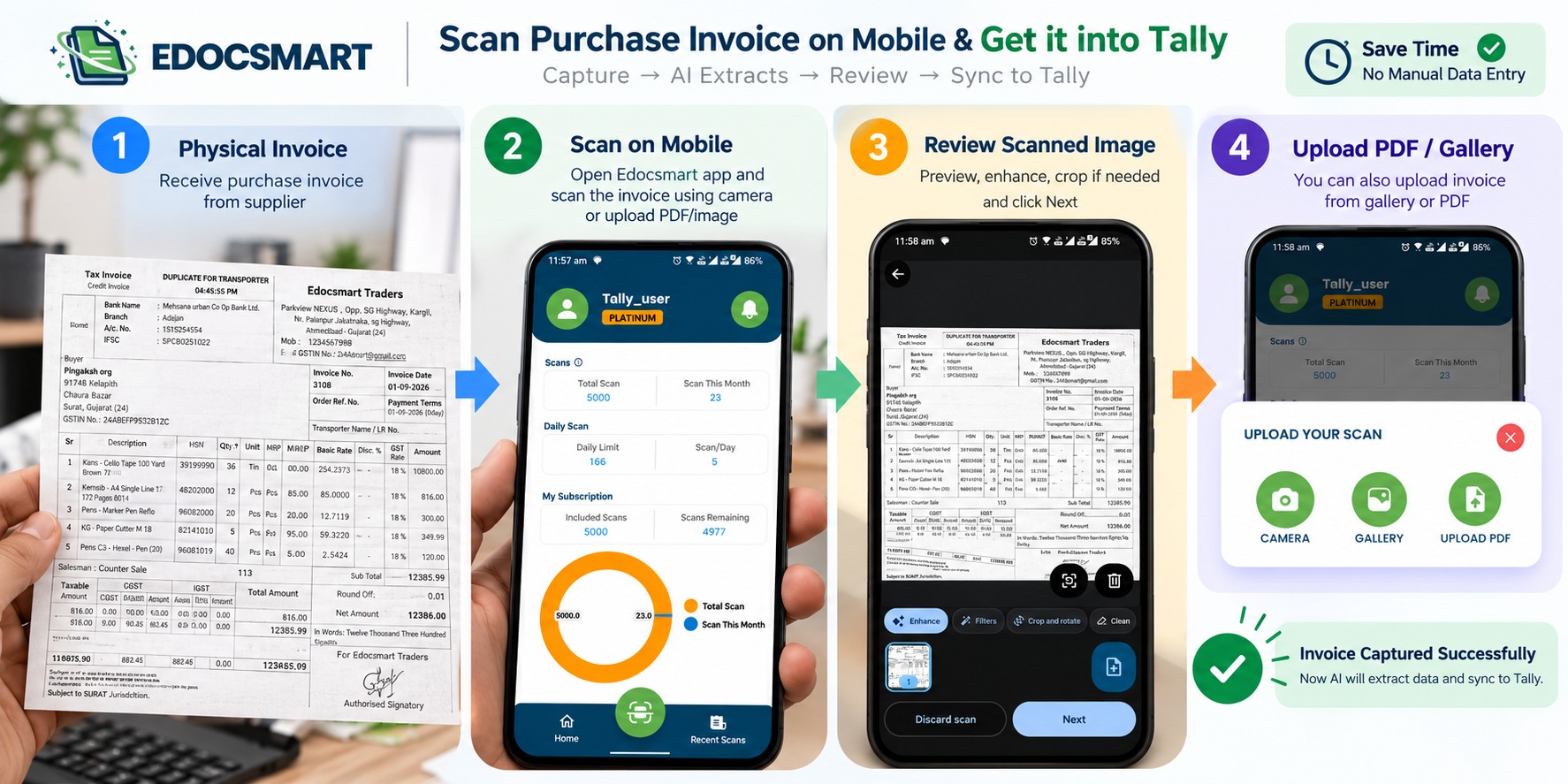
Step 2: Upload Invoices Directly
If the invoice is already available digitally, you can upload it directly to Edocsmart through the web application.
This gives businesses two simple ways to start the process:
Physical invoice → Scan using mobile
|
Digital invoice → Upload through web
Both workflows lead to the same invoice processing system.
Step 3: AI Invoice Processing
Once the invoice reaches EdocSmart, the system processes the document and extracts the available invoice information.
This is where AI Invoice to Tally becomes useful.
Instead of manually reading the invoice and entering every field, the invoice information is extracted and structured for further processing.
For example, the system can identify:
Supplier
ABC Traders
GSTIN
24XXXXXXXXXXXXXX
Invoice Number
INV-1045
Invoice Date
25 September 2026
Items
Product A, Product B, Product C
HSN
Relevant HSN information from the invoice
Quantity / Rate / Tax
Information available in the invoice
The user doesn't have to manually copy all of this information into Tally.
Step 4: Verify the Extracted Data
Automation should always have a verification layer.
Before creating the accounting entry, the user can review the information extracted from the invoice.
This is particularly important because invoices can have different formats, layouts, fonts, tables, and document qualities.
The workflow is therefore not:
AI → Tally without checking
Instead, it is:
AI →
Review → Approve → Tally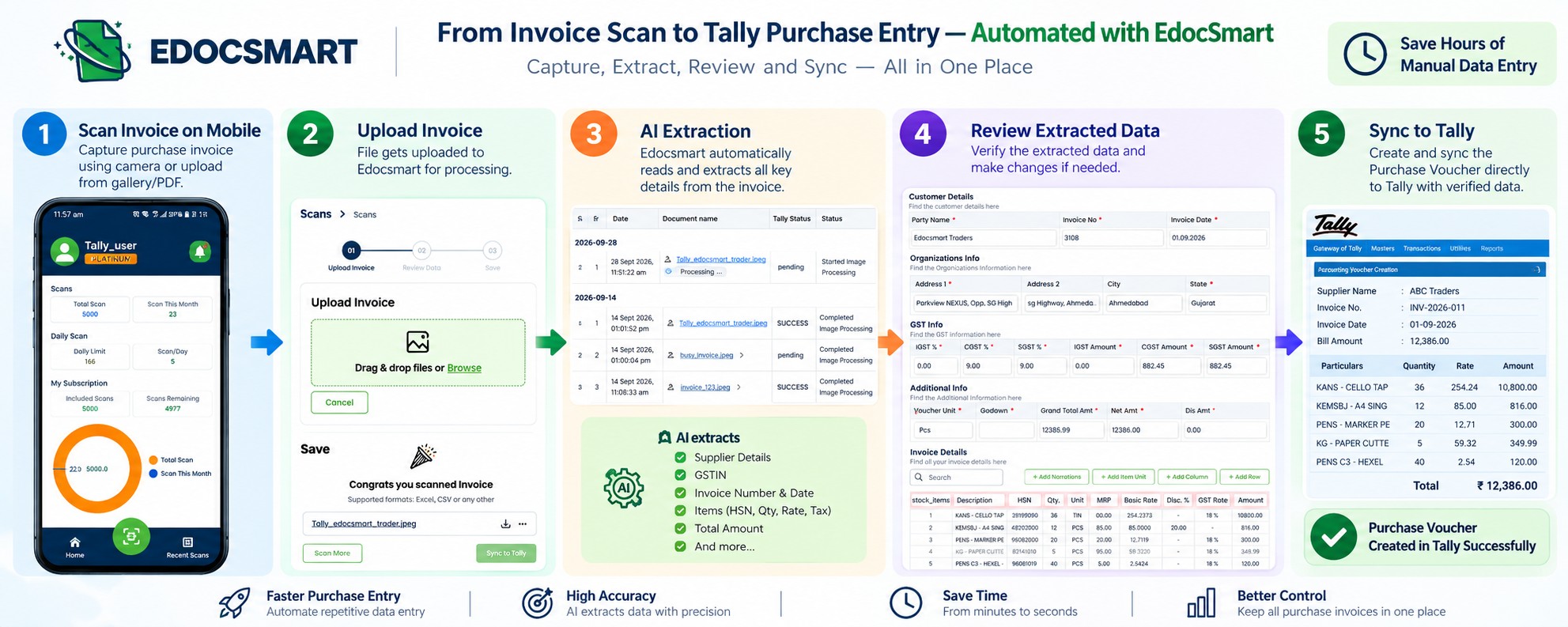
This gives the business owner or accounting team control over what eventually gets synced into Tally.
Step 5: Create the Party Ledger in Tally
Now comes an important part of the purchase-entry process.
Suppose this is the first invoice received from a new supplier.
Normally, someone may have to manually create the supplier's party ledger in Tally.
They may need to enter:
- Party name
- Address
- GST number
- Other available details
With EdocSmart, the relevant supplier information available on the invoice can be used while creating the party ledger.
This
means the person handling accounts doesn't have to manually copy the same
information from the invoice into Tally.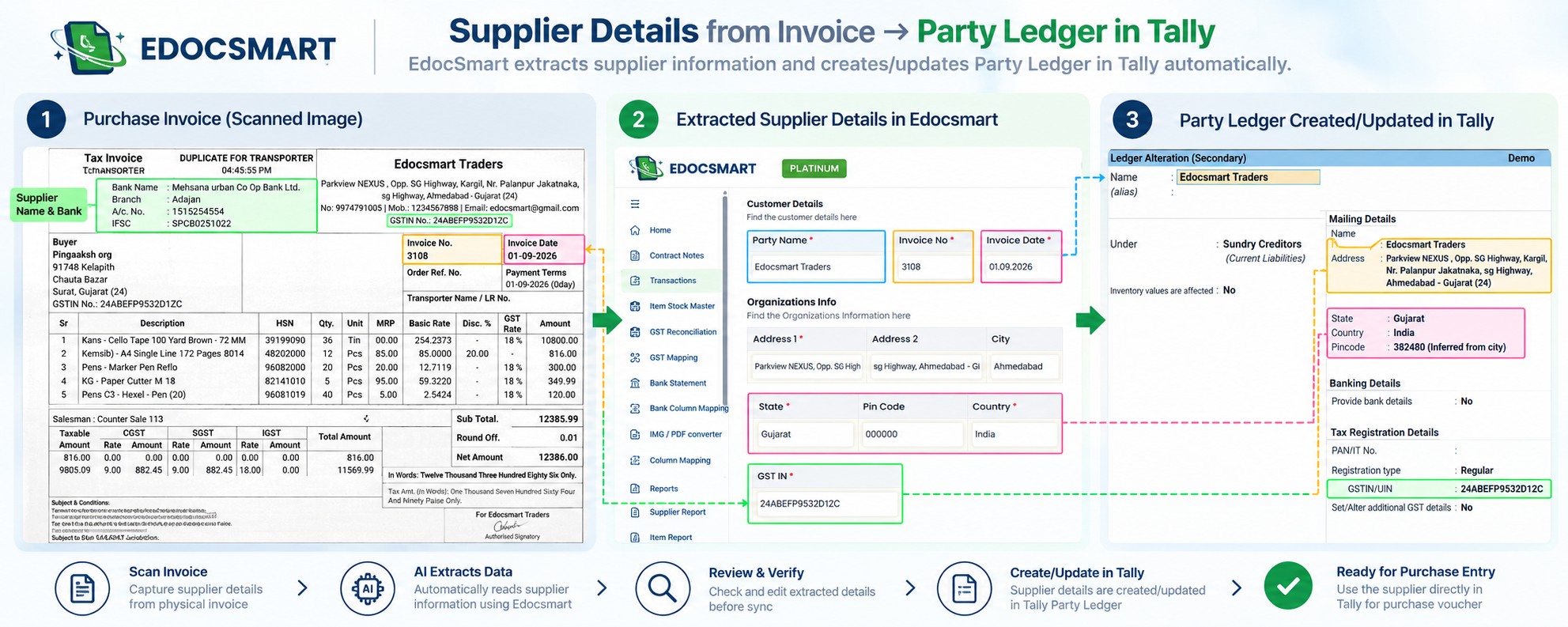
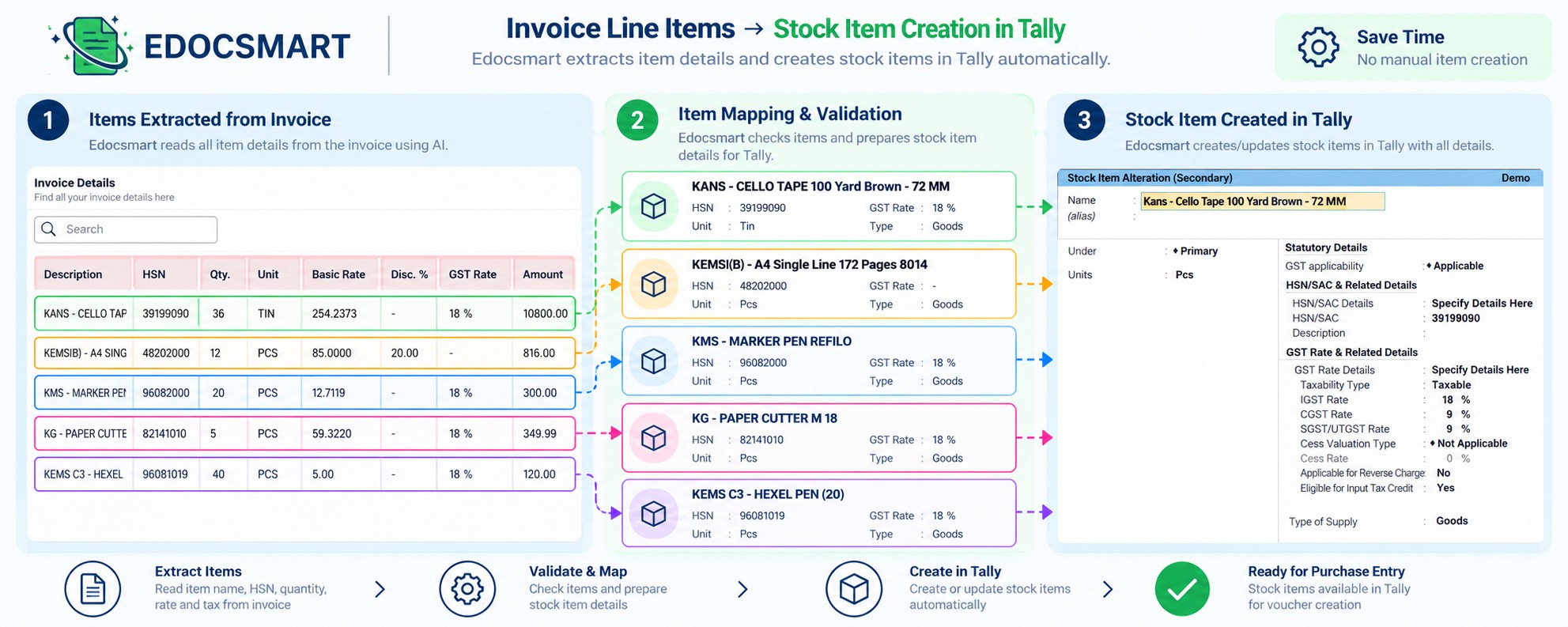
Step 6: Create Stock Items
Purchase invoices often contain multiple line items.
Each item may have its own:
- Item name
- HSN
- Quantity
- Rate
- Tax information
- Other relevant details
When new items need to be created in Tally, manually setting them up can add another layer of work.
Edocsmart can use the information available in the invoice to help create the required stock items.
This makes the workflow more than just invoice data to Tally.
It connects invoice information with the accounting masters required for the transaction.
Step 7: Create the Purchase Voucher
Once the invoice information has been verified and the required masters are available, the purchase voucher can be created in Tally.
This means the overall process can move from:
Reading the invoice → Manual data entry → Master creation → Voucher creation
to:
Invoice →
AI Processing → Verification → Master Creation → Purchase Voucher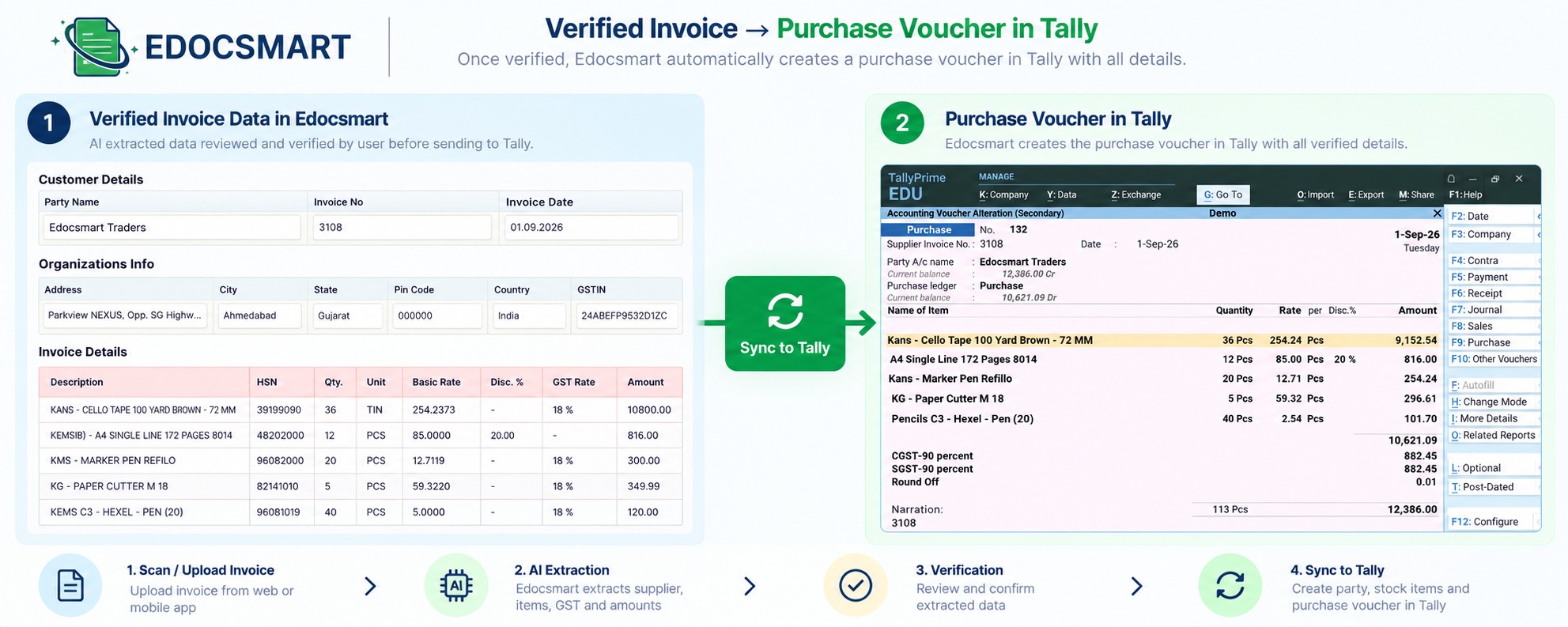
This is the practical value of automatic invoice entry in Tally.
A Startup Owner's Real-World Workflow
Let's take a simple example.
Imagine a startup with a small team of five people.
There is no dedicated accounting department.
The founder handles business development.
One employee manages operations.
Another person handles purchases.
And accounting responsibilities are shared among the team.
During the week, 40 purchase invoices arrive.
Earlier, someone would have to sit down and enter these invoices into Tally.
If the accounting workload became heavy, the owner might also sit with the team and start entering invoices.
This is not unusual in a growing business.
But it creates an unnecessary problem.
The owner may spend two or three hours doing invoice entry instead of working on customers, sales, suppliers, or business growth.
Visual: Realistic Indian startup office
with a five-person team. The founder is handling business activities while
another employee is dealing with a large set of purchase invoices.
A More Efficient Purchase Entry Workflow
With an automated invoice workflow, the same startup can change how it handles invoices.
Instead of immediately entering every invoice into Tally, the team can simply scan or upload the invoices as they arrive.
The workflow can be:
During the day
Receive invoice → Scan/Upload
Invoice processing
AI extracts invoice information
Verification
Review the extracted data
Accounting
Sync the
verified invoice to Tally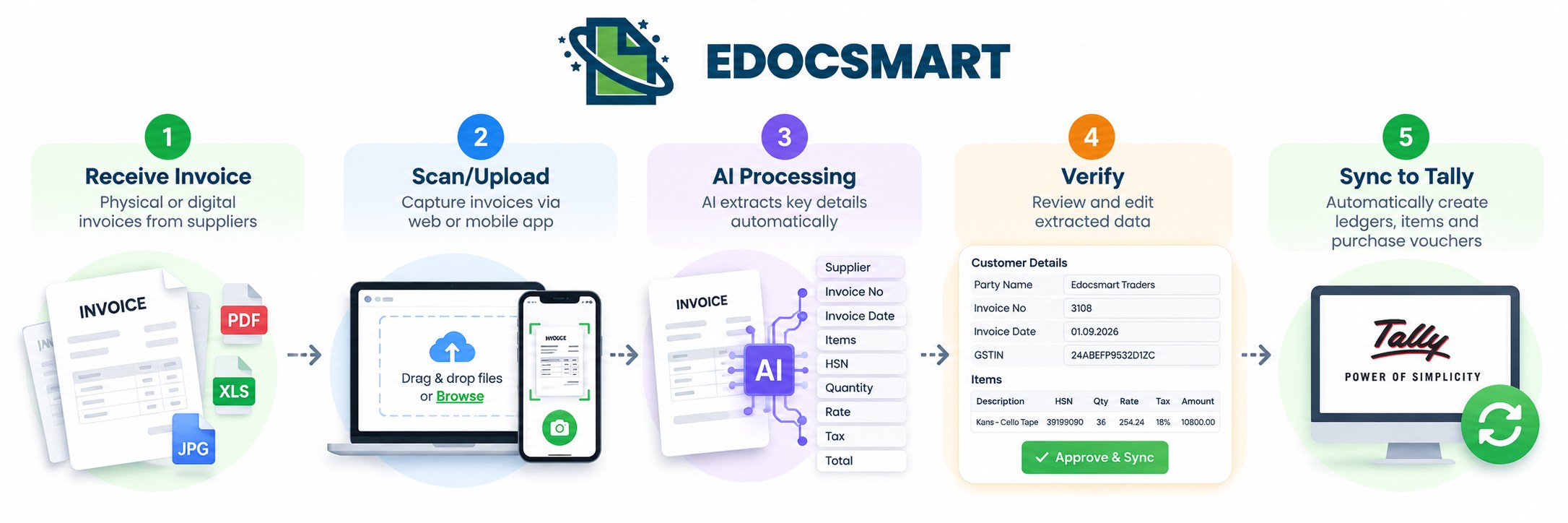 This
allows the team to process invoices together instead of constantly switching between
business operations and manual data entry.
This
allows the team to process invoices together instead of constantly switching between
business operations and manual data entry.
Invoice to Tally Tools for Small Businesses
Businesses looking for invoice to Tally tools should consider the complete workflow rather than only looking at invoice scanning.
A useful solution should help answer questions such as:
- Can I scan invoices from my phone?
- Can I upload digital invoices?
- Can the software extract invoice information?
- Can I verify the extracted data?
- Can it handle GST invoice information?
- Can it create party ledgers?
- Can it create stock items?
- Can it create purchase vouchers?
- Can the verified information be synced to Tally?
The more of these steps that can be handled within one workflow, the less manual work the accounting team needs to perform.
Converting GST Invoice to Tally
For businesses dealing with GST invoices, manually entering tax-related information can add another layer of complexity.
The invoice contains supplier GST information, item-level details, HSN information, taxable values, and applicable tax amounts.
A
workflow designed to convert GST invoice to Tally can extract these
details from the invoice and use them as part of the accounting entry.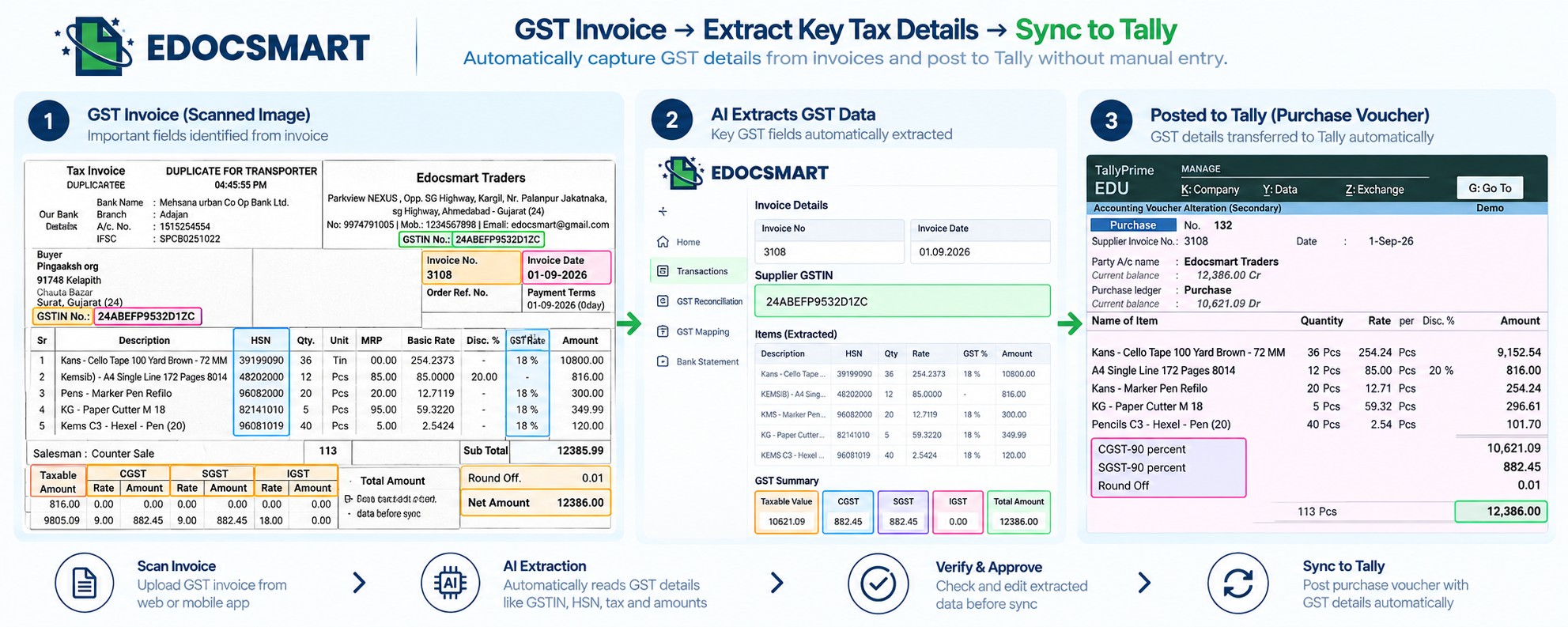
This can reduce the need to manually read and enter GST-related information for every purchase invoice.
However, the extracted information should still be reviewed before the final accounting entry is created.
What Is Automated Invoice Entry in Tally?
Automated invoice entry in Tally means using software to reduce the manual effort involved in converting invoice information into Tally entries.
Instead of manually entering:
- Supplier details
- GST information
- Items
- HSN
- Quantity
- Rate
- Taxes
- Voucher details
the information can first be extracted from the invoice and then transferred into the Tally workflow after verification.
This is why automated invoice entry in Tally can be particularly useful for startups and small businesses where employees often handle multiple responsibilities.
AI Invoice Processing for Tally: Why Verification Still Matters
AI can significantly reduce manual data entry, but businesses should still have a verification process.
Invoices are not always standardized.
Different suppliers may use different formats.
Some invoices may be scanned documents, while others may be digitally generated PDFs.
There can also be differences in:
- Table layouts
- Product descriptions
- Tax structures
- HSN presentation
- Invoice quality
- Document formatting
That is why the ideal workflow isn't about removing the human completely.
It is
about removing repetitive typing and allowing the human to focus on verification
and decision-making.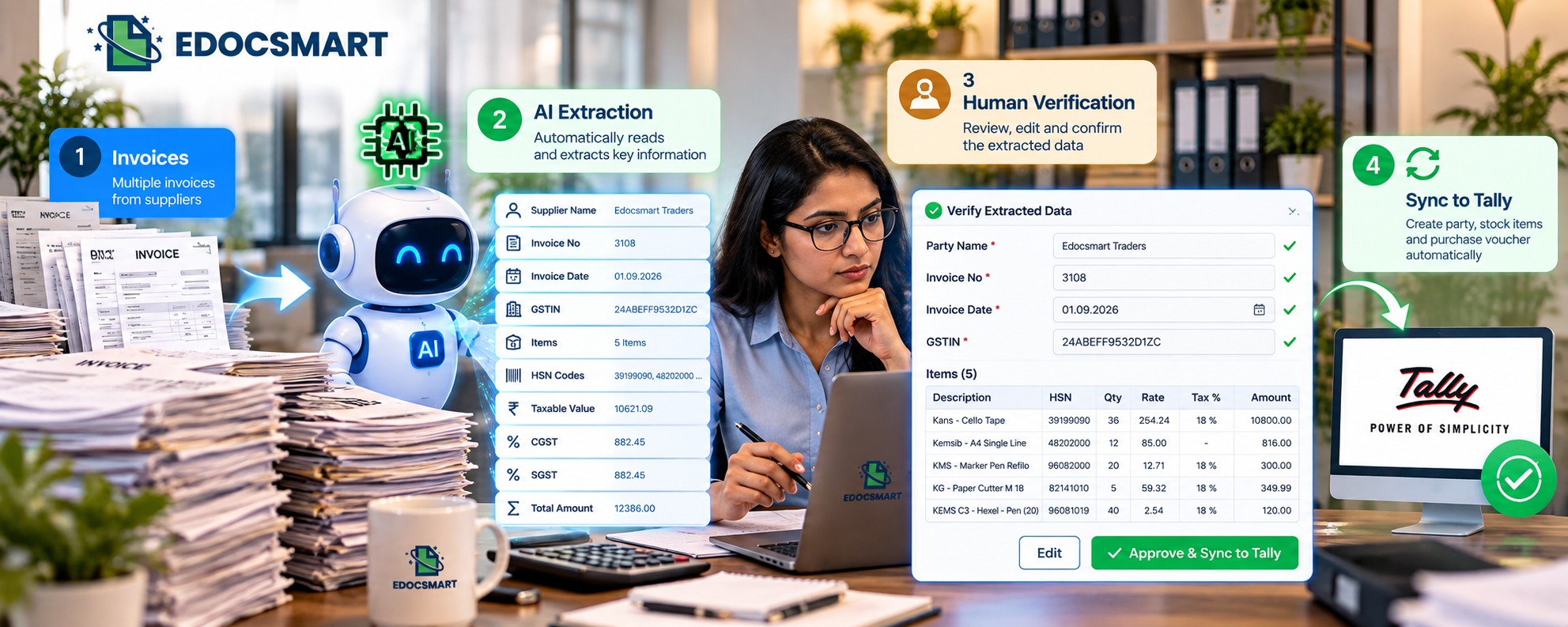
With Edocsmart, the workflow follows this principle:
AI extracts → Human verifies → Tally receives the verified data
How Much Can Purchase Entry Automation Save?
The exact amount of time saved depends on the number of invoices, invoice complexity, existing accounting processes, and the amount of manual work currently being performed.
For a startup processing a high volume of purchase invoices, however, even a few minutes saved per invoice can add up significantly over a month.
Consider a team that spends several hours every week entering purchase invoices.
If that work is reduced to scanning, reviewing, and syncing invoices, those hours can potentially be redirected toward more important business activities.
For an owner who occasionally has to sit down and perform accounting data entry themselves, this can be even more valuable.
The goal isn't simply:
"Enter invoices faster."
The goal is:
"Spend
less time entering invoices manually."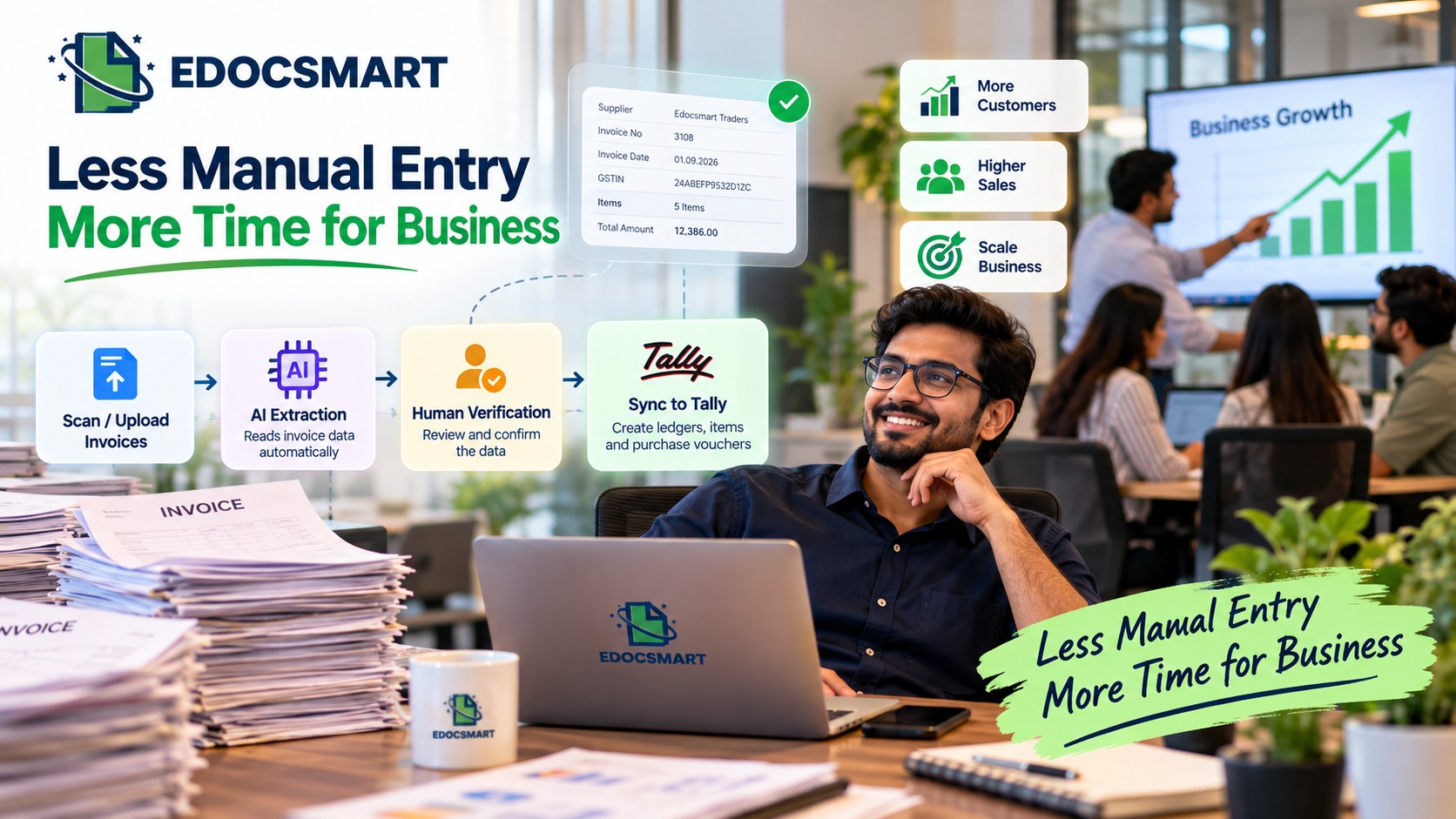
How EdocSmart Helps Automate Purchase Entries in Tally
EdocSmart brings the complete invoice-to-Tally workflow into a single process.
You can:
- Scan invoices from the mobile application
- Upload invoices through the web application
- Extract invoice information using AI
- Review and verify the extracted data
- Create party ledgers using invoice information
- Create stock items using invoice line-item details
- Create purchase or sales vouchers
- Sync the verified information to Tally
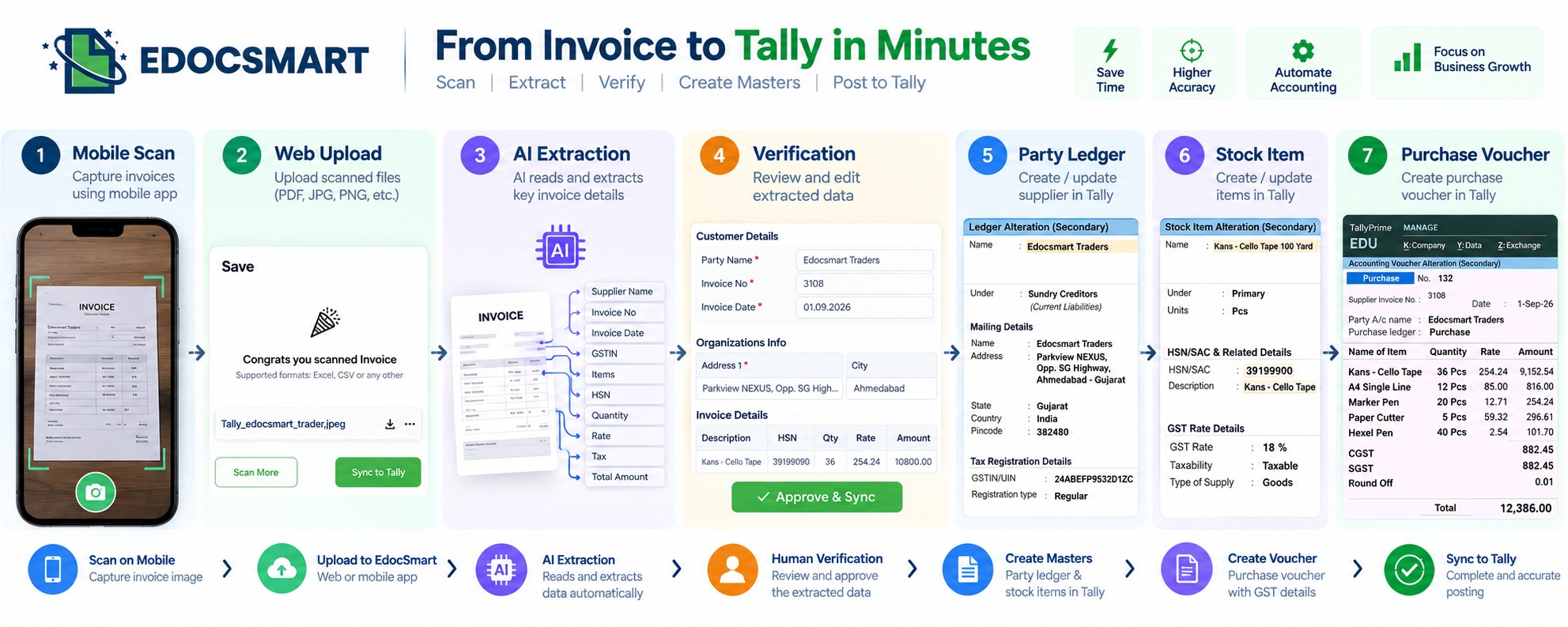
This means the business doesn't have to treat invoice processing and Tally entry as two completely separate activities.
The invoice becomes the starting point for the accounting workflow.
Choosing a Top Invoice to Tally Software
When businesses search for the Top invoice to Tally software or invoice to Tally software India, the important thing is to look beyond marketing claims and understand the actual workflow.
For a small business or startup, the software should ideally help reduce the work that employees—and sometimes the owner—have to perform manually.
Look for a solution that supports:
Mobile scanning
↓
Invoice upload
↓
AI extraction
↓
Verification
↓
Tally master creation
↓
Purchase voucher creation
↓
Tally synchronization
This gives you a clearer picture of whether the solution can actually reduce purchase-entry work.
From Manual Purchase Entry to Tally Invoice Automation
For a startup, automation doesn't always mean replacing people.
Sometimes it simply means allowing a small team to accomplish more without adding another layer of repetitive work.
Instead of having someone sit for hours and manually enter every purchase invoice into Tally, the team can scan invoices, let AI process them, verify the information, and sync the completed entries.
The owner doesn't have to become the full-time data-entry operator.
The accounting team doesn't have to spend the entire day typing invoice information.
And the business gets a more structured workflow for moving invoices into Tally.
FAQS
1. Can invoice entry in Tally be automated with Edocsmart?
Yes. With Edocsmart, invoice data can be extracted from supported documents, reviewed in structured fields, and then synchronized with Tally through the configured connector and mapping setup.
2. What invoice details can Edocsmart extract?
Depending on the document and configuration, Edocsmart can help extract details such as supplier name, invoice number, date, GSTIN, HSN/SAC, item description, quantity, rate, CGST, SGST, IGST, taxable value, and invoice total.
3. Do I need to map invoice fields every time?
Not always. Mapping is mainly part of the initial setup. Once the required fields, ledgers, stock items, GST structure, and templates are configured, the same setup can be reused where applicable.
4. Can I review invoice data before it goes to Tally?
Yes. Edocsmart allows users to review the extracted supplier, item, GST, and amount details before synchronization. If any field needs correction, it can be checked before the final Tally entry.
5. Can scanned invoices, PDFs, and invoice photos be processed?
Supported PDFs, scanned invoices, JPEGs, and clear invoice photos can be used in the invoice-processing workflow. The document is processed first, and the extracted data is then reviewed before it moves further.
6. Does Edocsmart directly create a Tally voucher?
Edocsmart processes and prepares the verified invoice data, which can then be synchronized through the configured Tally connector. The final voucher, ledger, stock, and GST structure depends on the business’s mapping and Tally configuration.
Conclusion
For startups and small businesses, purchase entry in Tally can become a surprisingly time-consuming task.
When the team is small, the responsibility often falls on whoever is available—including the business owner.
Manually reading invoices, entering supplier details, creating ledgers, adding stock items, entering HSN information, and creating purchase vouchers can take hours when invoice volumes increase.
Invoice automation for Tally provides a way to reduce this repetitive work.
With Edocsmart, the workflow can be simplified to:
Scan or Upload → AI Invoice Processing → Verify → Sync to Tally
The system can use the invoice information to help create party ledgers, stock items, and purchase vouchers, reducing the amount of manual entry required.
For a
growing business, this means the team can spend less time performing repetitive
invoice data entry and more time focusing on the work that actually moves the
business forward.