How to Convert Bank Statement PDF to Tally
Convert bank statement PDFs into structured, reviewed, and ledger-mapped Tally entries with automated transaction extraction and sync through Edocsmart.
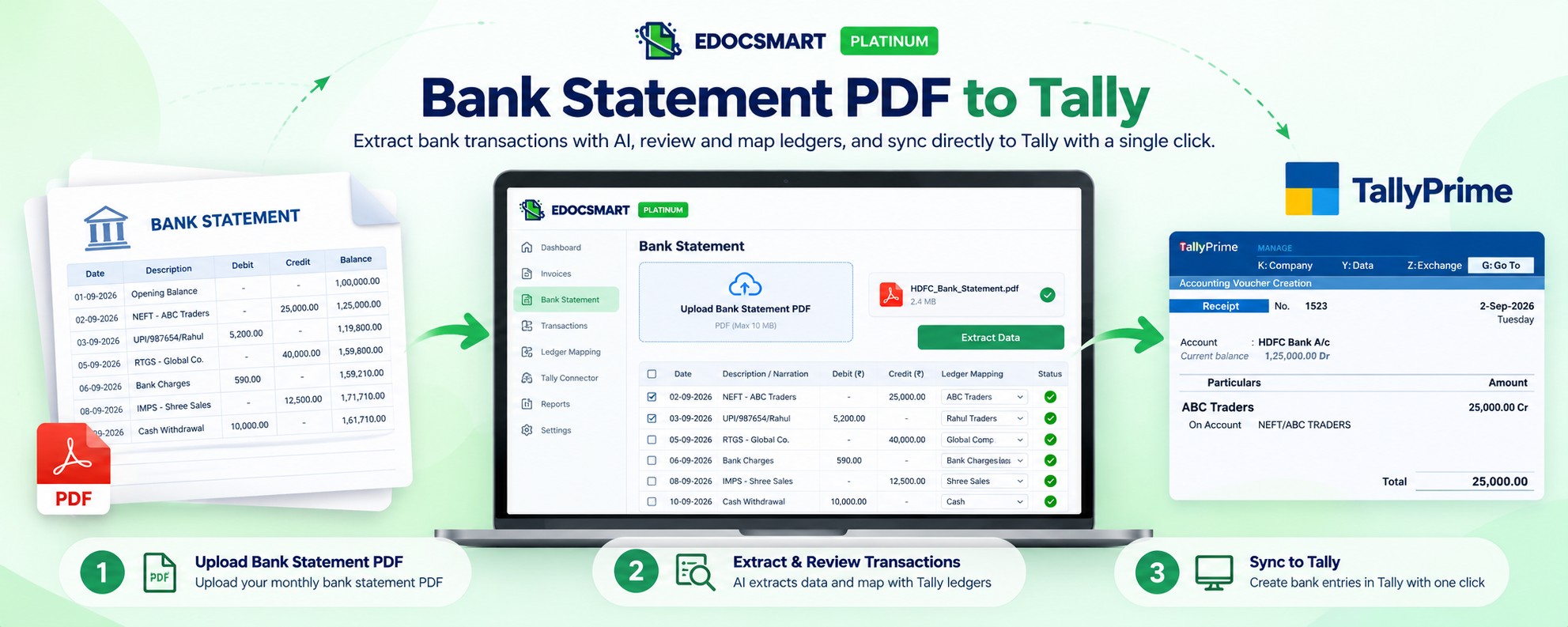
Bank statements are already structured records of money moving in and out of a business account. They contain transaction dates, descriptions, debit and credit amounts, balances, references, and other payment details.
The difficulty begins when the same information has to be entered again into Tally.
An accountant may receive a monthly bank statement containing hundreds of transactions. Instead of using that statement only as a reference and manually creating entries one by one, the PDF can be processed, converted into structured transaction data, reviewed, mapped with the appropriate accounting information, and then transferred into Tally.
This is the idea behind bank statement PDF to Tally automation.
With EdocSmart, the workflow can be organized as:
Bank Statement PDF → Data Extraction → Transaction Identification → Ledger Mapping → Review → Tally Connector → Sync to Tally
Why Convert a Bank Statement PDF to Tally?
A typical bank statement may contain information such as:
- Transaction Date
- Value Date
- Description / Narration
- Reference Number
- Cheque Number
- Debit Amount
- Credit Amount
- Running Balance
- Opening Balance
- Closing Balance
All of this information is useful for accounting, but a PDF is primarily designed for viewing.
Tally needs the transactions in an accounting-ready structure.
For example, a bank statement may show:
05-10-2026 | NEFT ABC Traders | ₹25,000 Credit
The accounting system still needs to understand what that transaction means.
Is it a customer receipt?
A transfer?
A refund?
A loan receipt?
Or another accounting transaction?
So converting a bank statement PDF to Tally is not simply about reading rows from a PDF. The transactions also need to be interpreted and connected with the correct accounting records.
Manual Bank Statement Entry Can Take Hours
Consider a monthly bank statement containing 350 transactions.
With manual entry, an accountant may repeatedly:
- Open the PDF
- Read the transaction
- Check whether it is debit or credit
- Identify the party
- Find the correct ledger in Tally
- Enter the amount
- Add the narration
- Save the voucher
- Move to the next transaction
The problem becomes larger when the statement contains similar narrations, bank charges, UPI transactions, NEFT payments, RTGS receipts, cheque entries, transfers, and hundreds of small transactions.
Instead of spending most of the time typing, the workflow can shift toward reviewing and verifying extracted data.
Manual process:
PDF → Read → Identify → Type → Check → Save
Automated process:
PDF → Extract → Map → Review → Sync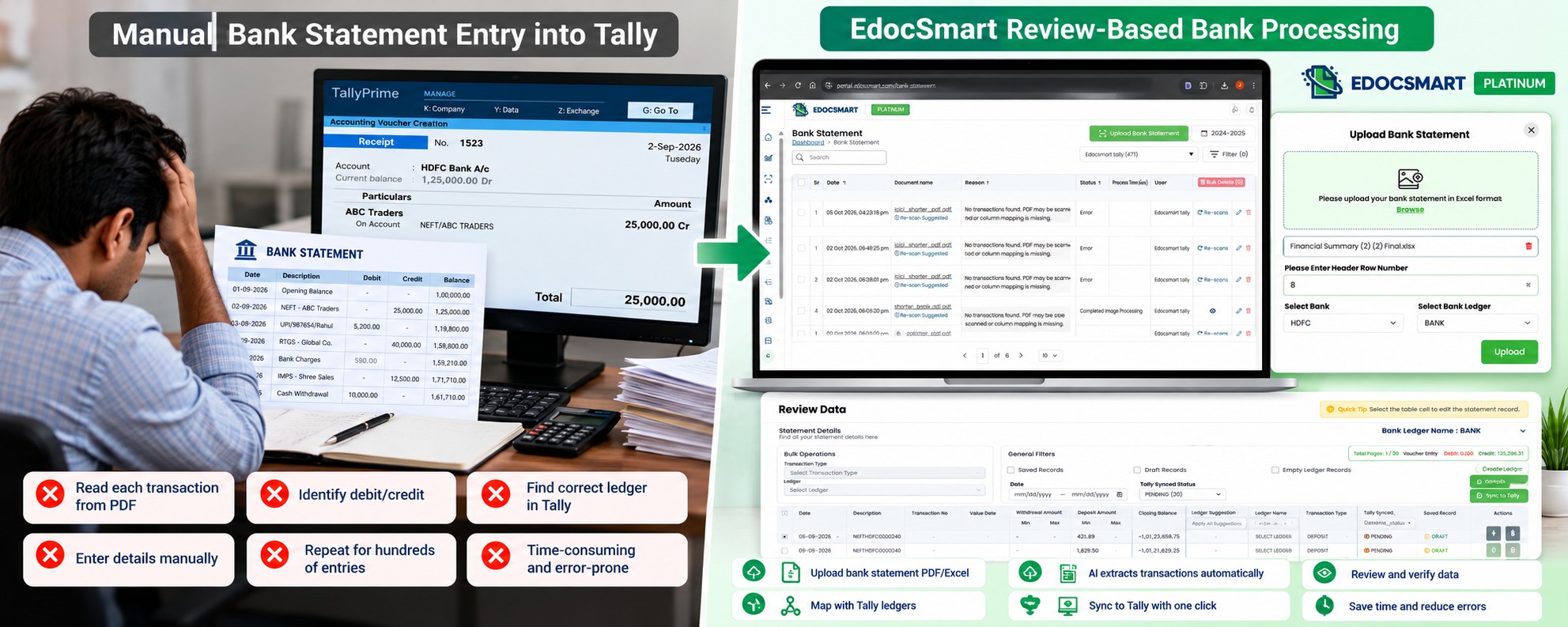
Step 1: Upload the Bank Statement PDF
The process begins with the original bank statement.
Upload the PDF bank statement into EdocSmart.
The document may contain dozens or hundreds of transaction rows.
The objective at this stage is not to manually prepare each voucher.
The bank statement itself becomes the source document for processing.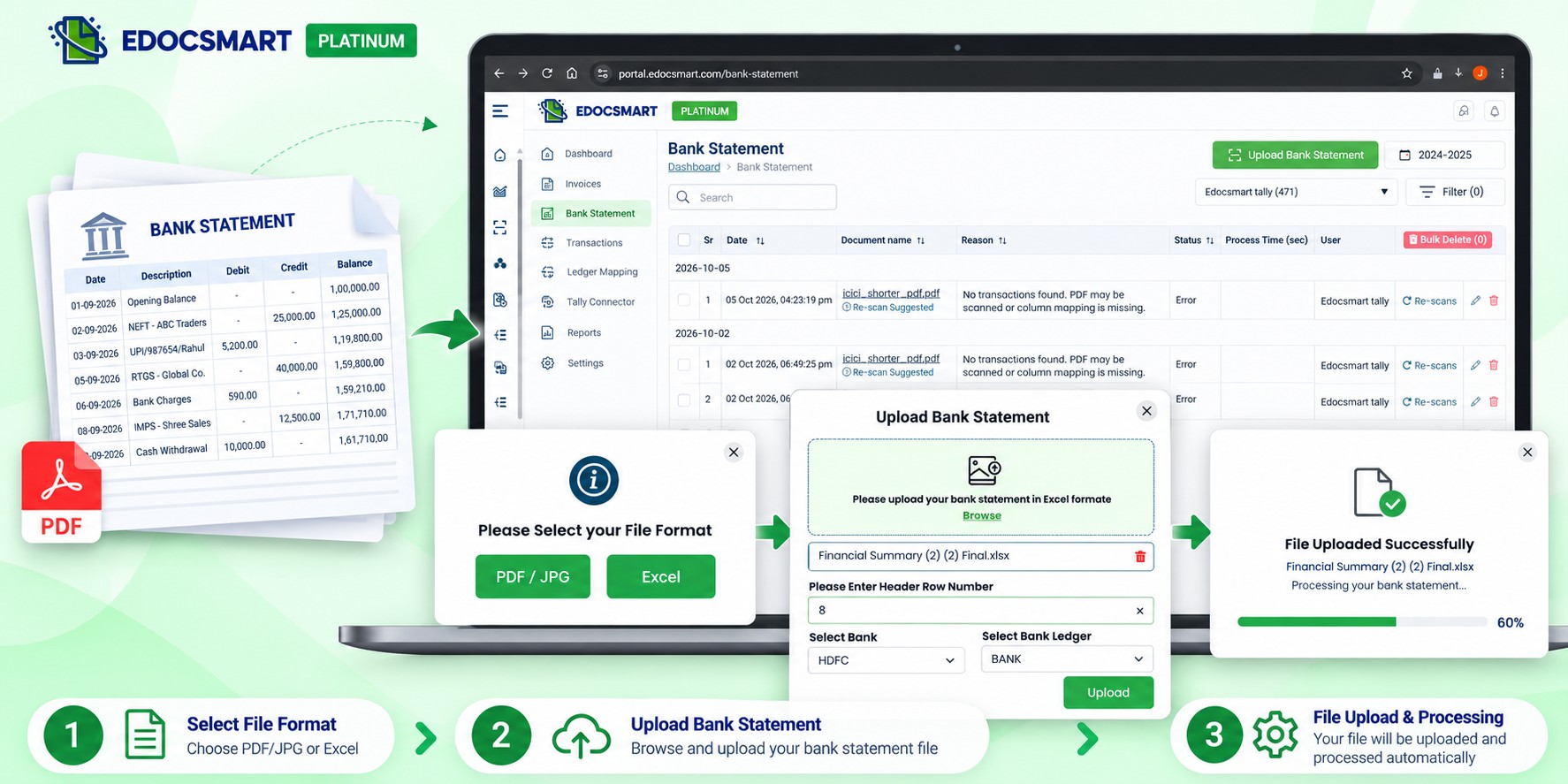
Step 2: Extract Transactions from the PDF
After upload, EdocSmart can process the bank statement and convert the information inside it into structured transaction rows.
Typical extracted information may include:
Date
Transaction Description
Reference
Debit
Credit
Balance
For example:
PDF Statement:
05/10/2026 | NEFT/ABC TRADERS/458795 | — | ₹25,000 | ₹1,75,400
Structured data:
Date → 05/10/2026
Narration → NEFT/ABC TRADERS/458795
Debit → —
Credit → ₹25,000
Balance → ₹1,75,400
This makes individual transactions easier to work with than reading them directly from the PDF.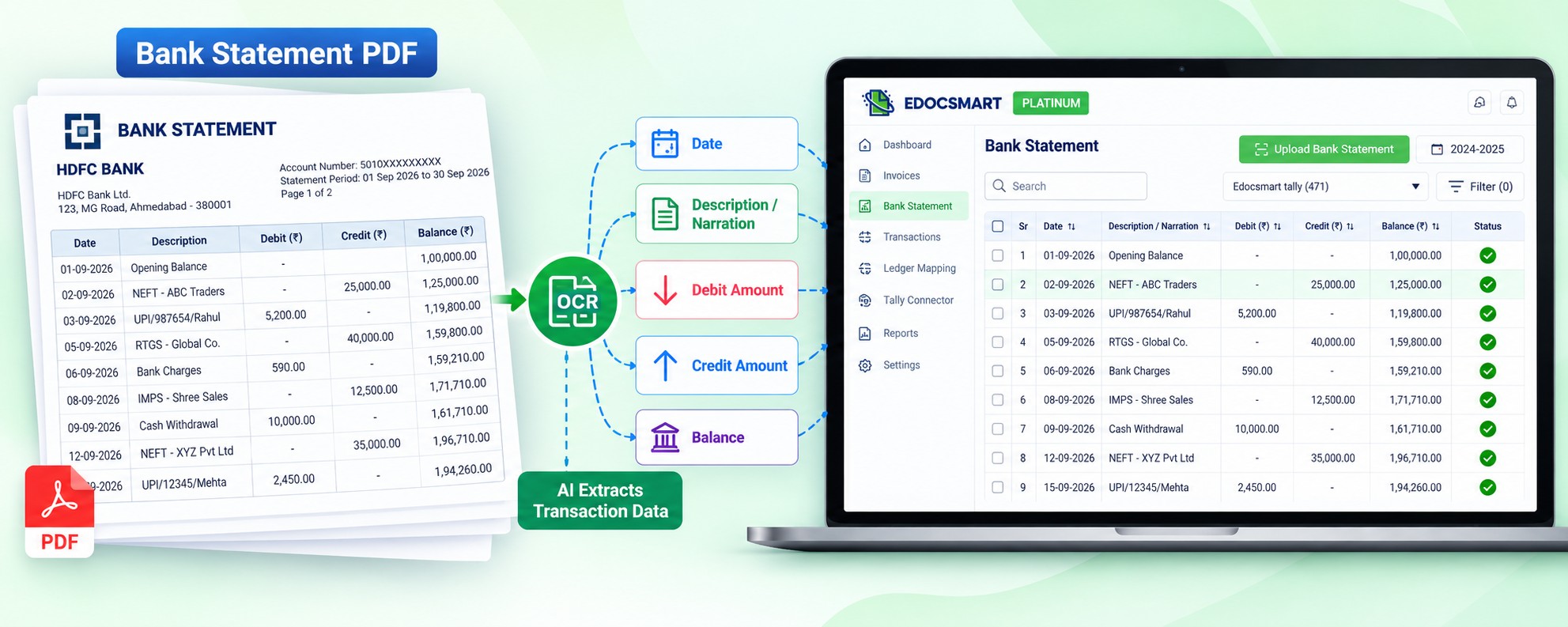
Step 3: Understand Debit and Credit Transactions
A bank statement records transactions from the bank's perspective.
That means the direction of money needs to be understood correctly before accounting entries are created.
For example:
Money received into the bank account appears as a credit in the bank statement.
Money paid from the bank account appears as a debit.
But simply knowing whether a transaction is debit or credit is not enough.
The accounting system may still need to determine:
- Which party is involved?
- Which ledger should be used?
- What type of voucher is appropriate?
- What narration should be retained?
This is where transaction identification and mapping become important.
Step 4: Map Bank Narrations with Tally Ledgers
Bank statements often contain narrations instead of clean accounting names.
For example:
UPI/458745/RAHULTRADERS
NEFT-HDFC0001234-ABCENTERPRISE
BANK CHARGES
GST ON BANK CHARGES
ATM CASH WITHDRAWAL
These values may need to connect with accounting ledgers such as:
Rahul Traders → Customer Ledger
ABC Enterprise → Supplier / Party Ledger
Bank Charges → Bank Charges Ledger
GST on Charges → Applicable Tax Ledger
Cash Withdrawal → Cash Ledger
A mapping tells the system how a bank transaction should be treated in Tally.
For recurring transactions, the same configured relationship can be reused depending on the setup.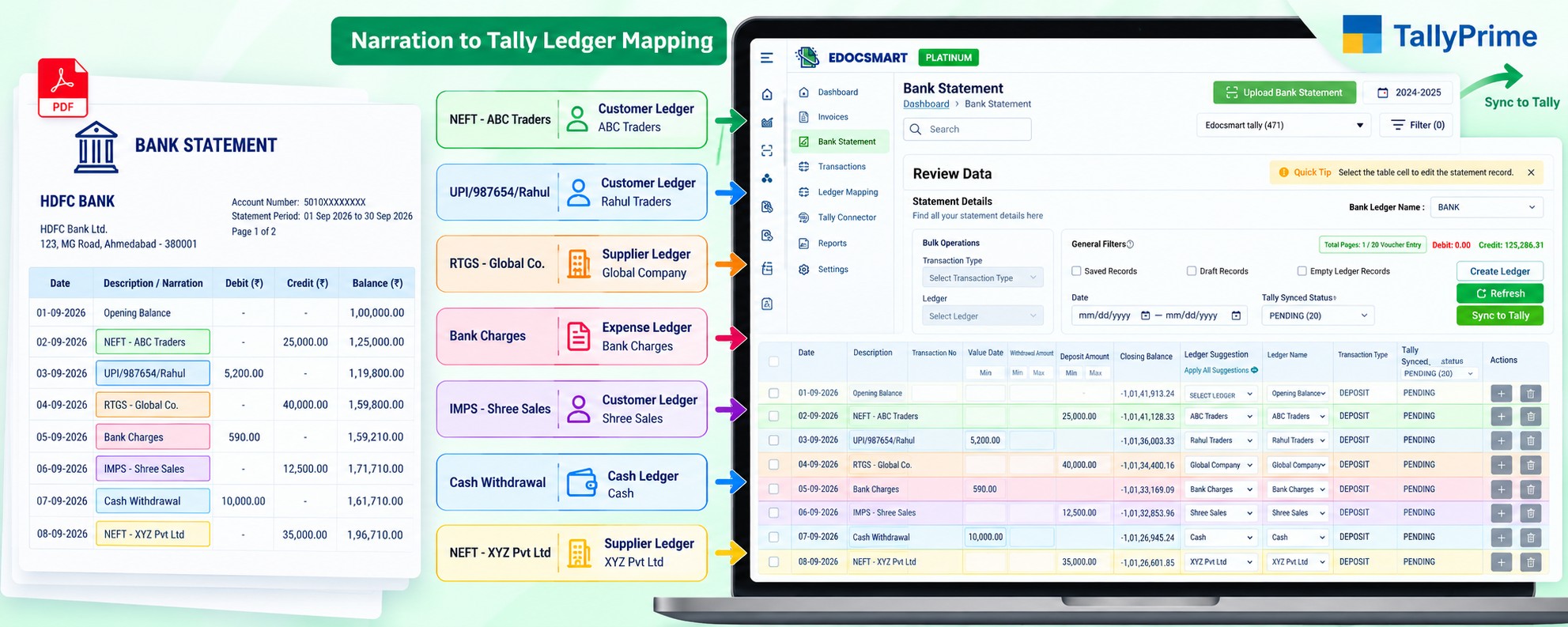 Why One-Time Mapping Matters
Imagine the same customer pays you every month using NEFT.
The bank narration may repeatedly contain a recognizable reference to that customer.
Instead of identifying the ledger manually every month, the mapping can help connect that transaction with the appropriate ledger.
For example:
- NEFT/ABC TRADERS → ABC Traders Ledger
- UPI/SHREE SALES → Shree Sales Ledger
- BANK CHARGES → Bank Charges Ledger
- CASH WITHDRAWAL → Cash Ledger
Once the same mapping continues to apply, repeated bank transactions become easier to process.
This is particularly useful for businesses with recurring customers, vendors, EMI payments, rent, bank charges, subscriptions, and other regular transactions.
Step 5: Review the Extracted Bank Transactions
Automation should not mean that every transaction is posted without verification.
Before sending transactions to Tally, review the extracted information.
Important fields to check include:
Transaction Date
Narration
Reference Number
Debit Amount
Credit Amount
Mapped Ledger
Transaction Type
Balance
If a transaction has been mapped incorrectly, it can be corrected before synchronization.
For example:
Extracted Narration → UPI/ABC/4586
Suggested Ledger → ABC Traders
Amount → ₹15,000
Type → Receipt
The accountant can verify whether the accounting meaning is correct.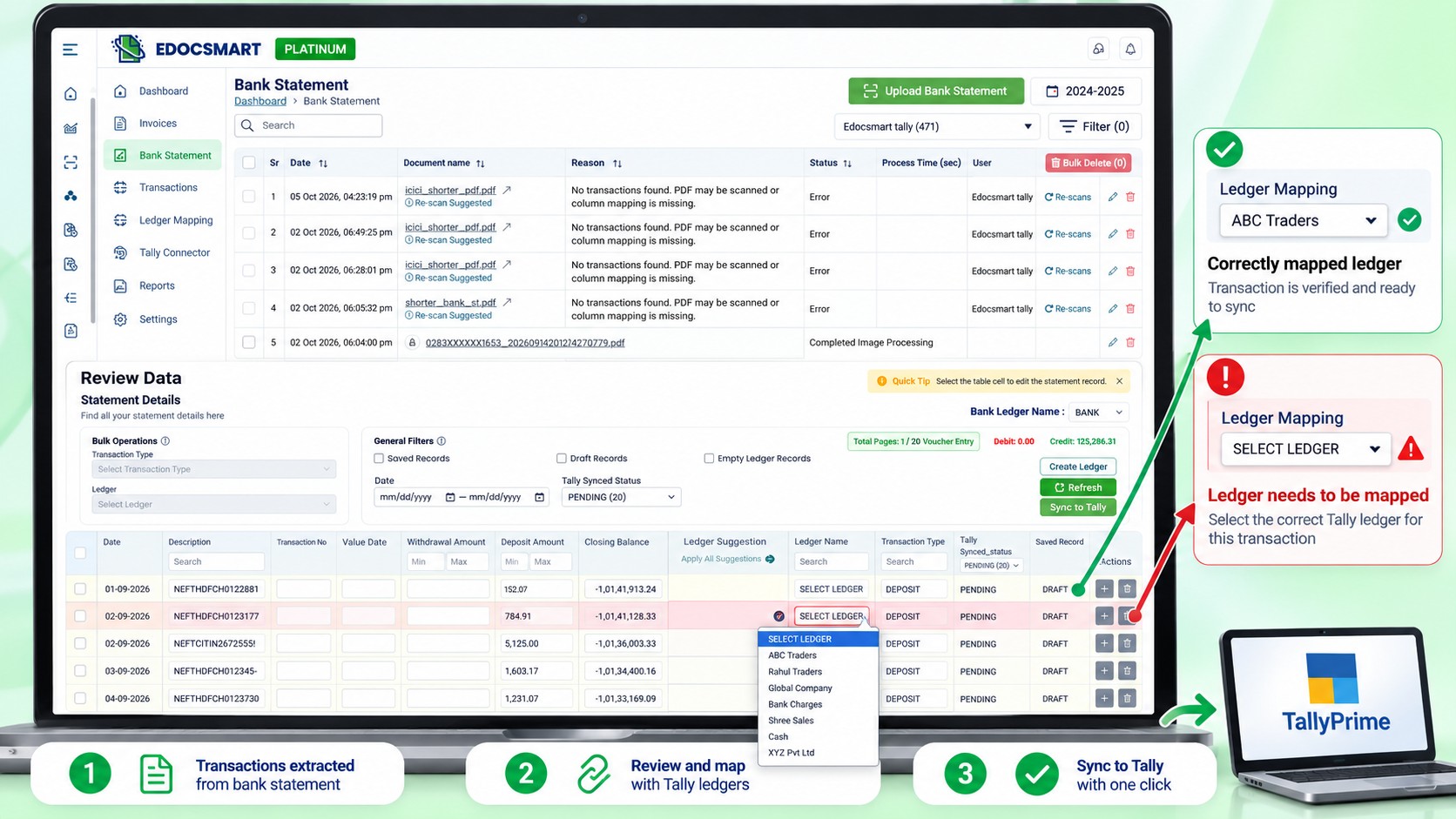
Step 6: Turn On the Tally Connector
Before synchronized transactions can reach the local Tally installation, the configured connector needs to be running.
EdocSmart's Tally Connector acts as the bridge between the reviewed bank transactions and Tally.
The process becomes:
Reviewed Bank Transactions → Tally Connector → Tally
If your organization uses another compatible connector, its required configuration and mapping should already be completed.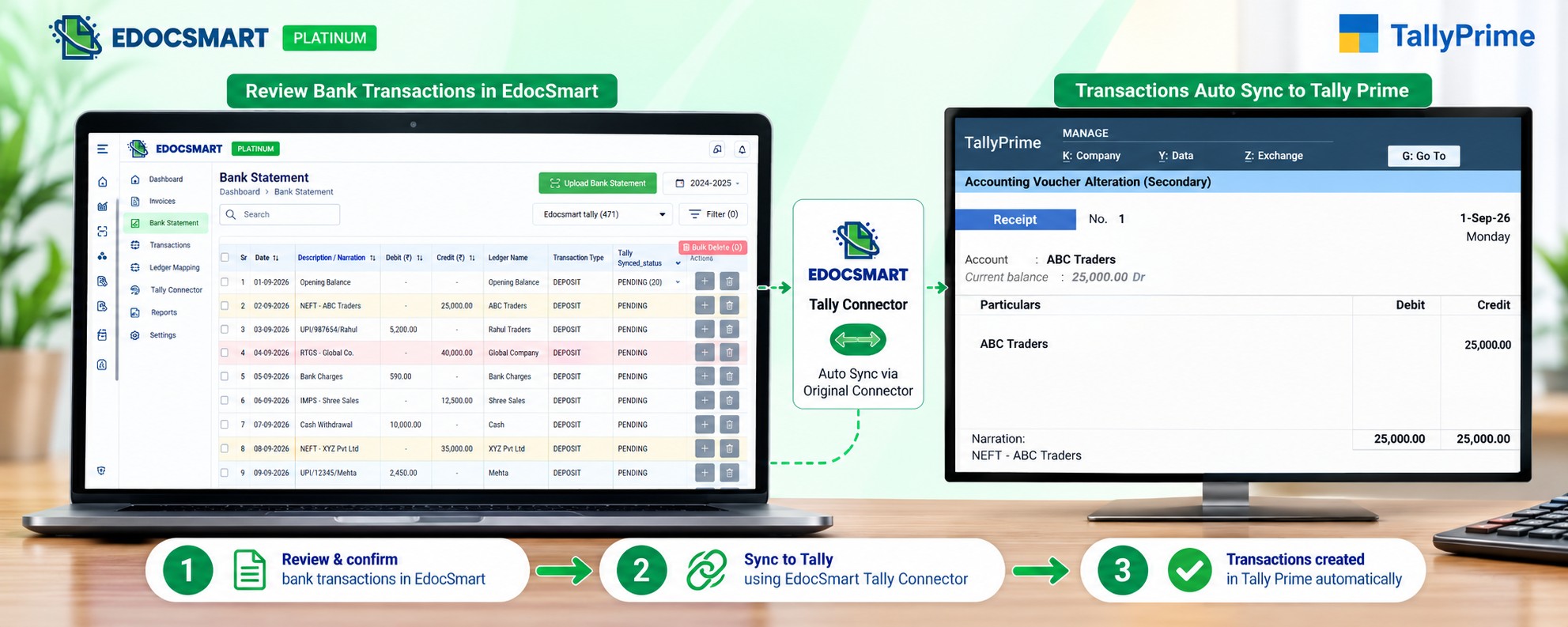
Step 7: Sync Verified Bank Transactions to Tally
After reviewing the transactions and confirming the mappings, the verified data can be synchronized with Tally.
Depending on the accounting setup and transaction type, the resulting entries may be handled as appropriate accounting vouchers.
For example:
Customer payment → Receipt-related entry
Supplier payment → Payment-related entry
Cash withdrawal → Cash / Contra-related treatment
Bank charges → Expense-related entry
Internal transfer → Contra-related treatment
The exact voucher treatment depends on the organization's Tally configuration and accounting rules.
This is why review and mapping are important before synchronization.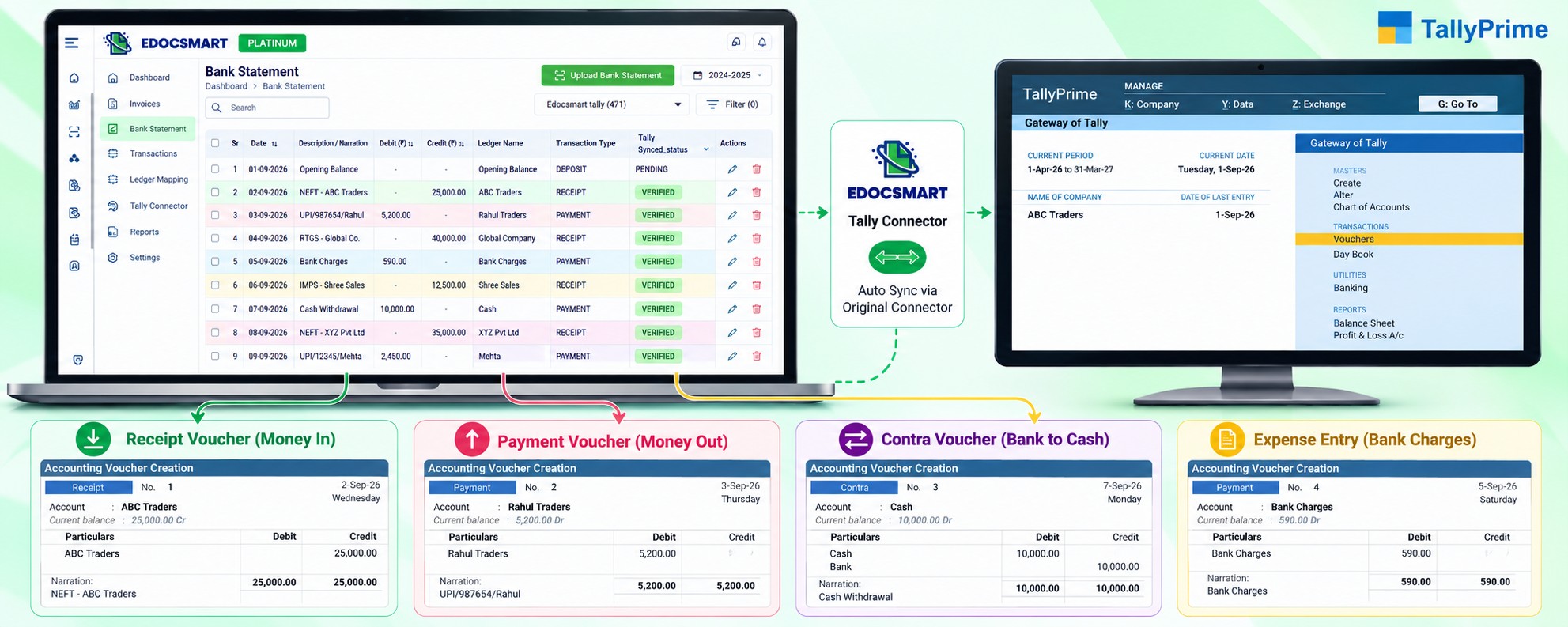 Example: Customer Payment from a Bank Statement
Suppose the bank statement contains:
Date: 05-10-2026
Narration: NEFT ABC TRADERS
Credit: ₹50,000
Balance: ₹2,45,000
The transaction can be interpreted as money received into the bank account.
If ABC Traders is mapped to the corresponding Tally ledger, the transaction can be prepared according to the configured receipt workflow.
Instead of manually reading the statement and searching for the party every time, the structured transaction is already available for review.
Example: Supplier Payment
Now consider:
Date: 06-10-2026
Narration: RTGS GLOBAL COMPONENTS
Debit: ₹32,500
Balance: ₹2,12,500
This indicates money moving out of the bank account.
If Global Components is mapped with the correct supplier ledger, the transaction can be prepared according to the configured payment workflow.
The important point is that the same bank statement may contain many different accounting transaction types.
Example: Bank Charges
Bank statements also contain entries that do not represent customers or suppliers.
For example:
BANK CHARGES → ₹590 Debit
Instead of mapping this transaction to a party ledger, it may need to be connected with a Bank Charges ledger.
Similarly, other bank-related charges or taxes may require their own accounting treatment.
This is why a bank statement import is more than a simple debit-credit copy.
How Opening and Closing Balances Help with Verification
A bank statement usually contains an opening balance and a closing balance.
These values can provide an additional check while reviewing the extracted statement.
For example:
Opening Balance: ₹1,50,000
Total Credits: ₹2,40,000
Total Debits: ₹1,80,000
Expected Closing Balance: ₹2,10,000
The extracted transaction values should logically reconcile with the statement's balance movement.
This does not replace accounting reconciliation, but it provides another useful check before or after transaction processing.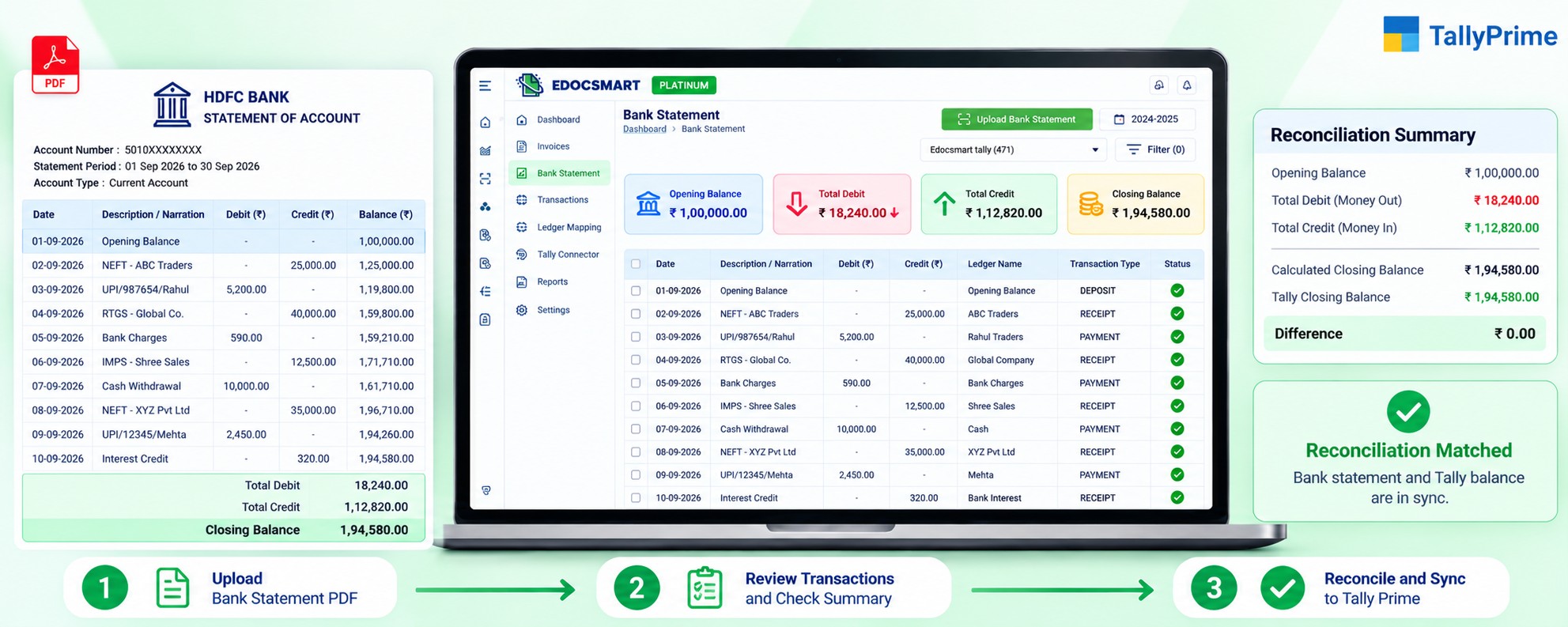 Bank Statement Import and Bank Reconciliation Are Related but Different
Importing transactions and reconciling transactions are related processes, but they are not exactly the same.
Bank statement import focuses on bringing the bank transactions into the accounting workflow.
Bank reconciliation focuses on comparing bank records with the transactions recorded in the books.
For example, a cheque may have been entered in Tally on one date but cleared by the bank later.
Similarly, bank charges may appear in the statement before they have been recorded in the books.
Therefore:
Bank Statement Import → Creates / prepares accounting transactions
Bank Reconciliation → Compares bank records with book records
A structured bank statement to Tally workflow can make the reconciliation process easier because the bank data is already available in a usable format.
What Types of Bank Transactions May Appear?
A bank statement can contain many transaction patterns.
Common examples include:
NEFT receipts
RTGS payments
IMPS transactions
UPI receipts and payments
Cheque deposits
Cheque payments
Cash deposits
Cash withdrawals
Bank charges
Interest received
Interest paid
EMI payments
Internal transfers
Refunds
Payment gateway settlements
Each transaction may require different accounting treatment.
This is why ledger mapping and human review remain important even when transaction extraction is automated.
How EdocSmart Changes the Accountant's Role
Manual bank entry makes the accountant responsible for both typing and verifying.
Automation changes that balance.
Instead of spending most of the time copying:
Date
Narration
Debit
Credit
Amount
the accountant can spend more time confirming:
Is the transaction mapped to the correct ledger?
Is the voucher treatment correct?
Is the amount correct?
Does the transaction belong to the right party?
This moves the workflow from data entry toward accounting verification.
When Bank Statement PDF to Tally Is Most Useful
This workflow is particularly useful when a business handles:
High-volume bank transactions
Monthly bank statements
Multiple customer receipts
Regular supplier payments
Recurring bank charges
UPI-heavy transactions
Branch bank accounts
Statements received only in PDF format
Long transaction histories
When hundreds of transactions are already present in a PDF, entering them again manually adds work without adding new information.
FAQS
How can I convert a bank statement PDF to Tally?
A bank statement PDF can be processed through Edocsmart to extract transaction information, review ledger mappings, verify the records, and prepare the approved data for synchronization with Tally.
How does Edocsmart extract data from a bank statement PDF?
Edocsmart processes the uploaded bank statement and extracts transaction information such as transaction date, narration, reference details, debit amount, credit amount, and balance.
How are different bank transactions converted into Tally entries?
Different bank transactions may require different accounting treatment. For example, a customer receipt, supplier payment, bank charge, or internal transfer can be assigned the appropriate transaction type and ledger before being synced to Tally.
How do I map bank statement transactions with Tally ledgers?
The extracted bank narration can be reviewed and connected with the appropriate Tally ledger. This helps when the narration in the bank statement does not exactly match the ledger name maintained in Tally.
How can I reuse ledger mapping for recurring bank transactions?
If the same transaction pattern and ledger mapping continue to apply, the configured mapping can generally be reused depending on the workflow setup. This reduces repeated mapping work for similar transactions.
How can I review bank statement transactions before sending them to Tally?
The Edocsmart review screen allows you to check transaction dates, narrations, debit amounts, credit amounts, balances, ledger selections, and transaction types. Any required corrections can be made before synchronization.
How do I sync bank statement transactions with Tally?
After reviewing the transactions and assigning the required ledgers, keep the configured Tally Connector running. The verified transaction data can then be synchronized with the local Tally instance.
How are bank charges handled while importing a bank statement into Tally?
Bank charge transactions can be identified during review and mapped to the appropriate bank charges or expense ledger according to the organization's accounting configuration.
How is bank statement import different from bank reconciliation?
Bank statement import brings transaction data into the accounting workflow and prepares it for Tally. Bank reconciliation is a separate process that compares bank statement transactions with entries already recorded in the books.
How can I verify the opening and closing balance after processing a bank
statement?
The opening balance, debit and credit transaction totals, and closing balance can be compared with the original bank statement. This provides an additional check that the processed statement data is consistent with the source document.
Conclusion
Converting a bank statement PDF to Tally is not simply about extracting debit and credit columns.
The real process is about turning bank transactions into accounting-ready information.
A useful workflow needs to:
Extract the statement data
Identify each transaction
Connect transactions with the correct ledgers
Review debit and credit information
Verify balances and mappings
Transfer approved transactions through the Tally Connector
The complete flow can be represented as:
Bank Statement PDF → Transaction Extraction → Ledger Mapping → Review → Verification → Tally Connector → Tally
With EdocSmart, the focus can shift from repeatedly typing bank statement rows to reviewing and verifying structured transactions before they reach Tally.
For a dedicated workflow, you can also refer to Bank Statement to Tally.