Stop Typing, Start Growing: How Pharma Distributors Can Import Purchase Bills into Tally in Seconds Using AI
If you are running a pharma distribution or stockist business in India, you know the “morning rush.” It starts at 9:00 AM. The delivery trucks from C&F agents of big brands like Sun Pharma, Cipla, or Abbott pull up at your warehouse. Within minutes, your desk is buried under a mountain of purchase invoices.
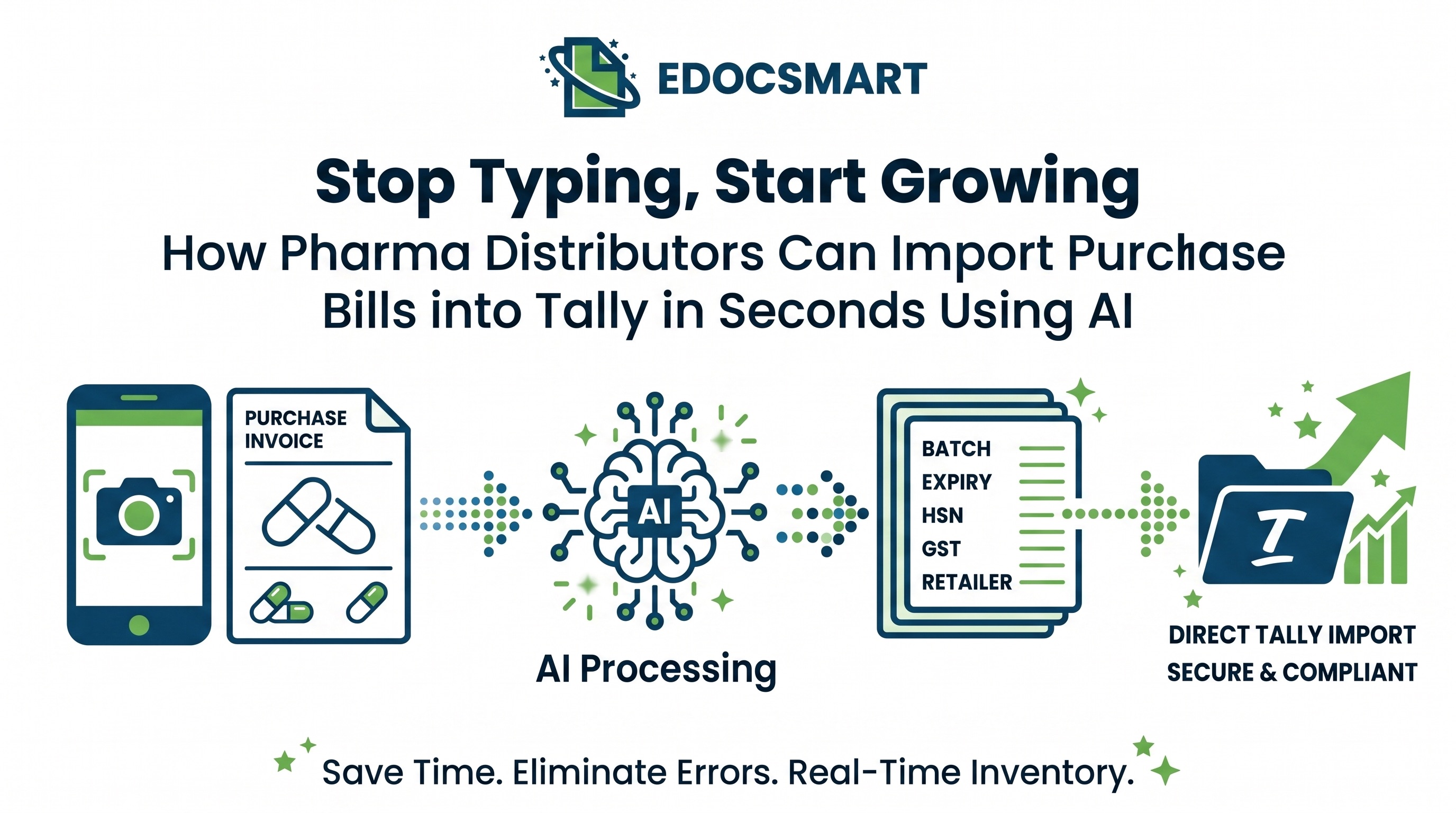
If you are running a pharma distribution or stockist business in India, you know the “morning rush.” It starts at 9:00 AM. The delivery trucks from C&F agents of big brands like Sun Pharma, Cipla, or Abbott pull up at your warehouse. Within minutes, your desk is buried under a mountain of purchase invoices.
Each of these invoices isn’t just a piece of paper; it’s a data nightmare. One single bill might have 50 different medicines. For every single item, your operator has to manually type the product name, the HSN code, the batch number, the expiry date, the quantity, the PTR (Price to Retailer), the discount schemes, and finally, the GST bifurcations.
By the time your team finishes entering yesterday’s 100+ purchase bills, it’s already evening. The sales team is screaming for updated stock levels, and your accountant is worried about GST mismatches.
The question is: Why are we still typing in 2024?
In this guide, I’m going to show you how AI-powered automation—specifically through EdocSmart—is changing the game. We’ll talk about how you can take a stack of purchase bills and turn them into perfect gst invoice entry in tally prime in literally seconds. No typos, no manual mapping, and no more month-end accounting headaches.
1. The High Cost of Manual Data Entry in Pharma Distribution
In many Indian pharma offices, the “Tally Operator” is the most overworked person. They spend 8 hours a day staring at physical bills and typing into a keyboard. But have you ever calculated the actual cost of this process?
When you do purchase invoice entry in tally manually, you aren’t just paying for the operator’s salary. You are paying for:
- Opportunity Cost: Your staff could be focusing on inventory management or debt recovery instead of data entry.
- Correction Cost: A single typo in a batch number or a GST percentage means hours spent later during reconciliation or, worse, during an audit.
- Delay Cost: If a purchase bill isn’t entered by 11:00 AM, your stock levels in Tally won’t reflect what’s actually in your warehouse. Your sales team might commit to orders you “don’t have” on screen, even if the medicine is sitting on the shelf.
Manual purchase invoice entry in tally erp 9 or Tally Prime is a bottleneck that prevents your business from scaling. You can’t grow your turnover if your back-office is stuck in 1995.
2. Why Pharma Invoices Are More Complex Than Regular Bills
If you were selling furniture, a purchase bill would be simple. But pharma is a different beast. Indian pharma distributors deal with specific complexities that make gst bill entry in tally prime a nightmare:
- The Batch Number & Expiry Duo: Every product has a unique identity. If you enter the wrong batch, your “Expiry Near” reports will be useless.
- Multi-Tiered Schemes: “Buy 10, Get 2 Free” or “5% + 2% Cash Discount.” Mapping these correctly so that your landing cost is accurate is mathematically exhausting.
- HSN and GST Diversity: From 5% to 12% to 18%, and occasionally exempt goods. Ensuring the gst invoice entry in tally prime matches the supplier’s GSTR-1 is critical for your Input Tax Credit (ITC).
- Supplier Formatting: Every pharmaceutical company has a different invoice layout. One puts the HSN on the left; another puts it at the bottom. A human can adapt, but traditional “templates” fail.
Expert Insight: In pharma, accuracy isn’t a luxury; it’s a regulatory requirement. Under the Drug and Cosmetics Act, tracking batches and expiries is mandatory. AI doesn’t just make it faster; it makes it compliant.
3. The Solution: How AI and OCR Are Revolutionizing Tally Accounting
This is where AI steps in. In the past, we had “OCR” (Optical Character Recognition), which was basically a fancy way of saying “the computer reads the text.” But old OCR was dumb. If the text shifted 2mm to the right, the software got confused.
Modern AI, like what we use in EdocSmart, doesn’t just “read” text—it “understands” the context. It knows that a 10-digit number near a date is likely a Batch Number. It knows that “Disc %” refers to the trade discount.
By using AI for purchase invoice entry in tally prime, you are essentially giving your computer a pair of eyes and a brain that understands Indian accounting standards. It can process a 3-page invoice from Zydus Cadila in roughly 5 seconds.
4. Step-by-Step: Importing Bills into Tally Using EdocSmart
If you’re wondering how to do purchase invoice entry in tally prime without typing every line, here is the operational workflow using EdocSmart. It’s designed to be so simple that even a non-accountant can do it.
Step 1: Collect and Upload
You receive your invoices either as physical paper or digital PDFs/WhatsApp images. * For Paper: Scan them using a basic scanner or your phone. * For Digital: Simply drag and drop the files into the EdocSmart portal. * Bulk Processing: You don’t have to do one by one. Drop 50 bills at once.
Step 2: AI Extraction
The AI engine starts working. It identifies the Supplier Name, Invoice Number, Date, and every single line item. It extracts: * Item Name * Quantity & Unit (Packs/Strips/Vials) * Batch Number & Expiry Date * Rate, Discount, and GST Values
Step 3: Smart Field Mapping
The first time you import a bill from a specific supplier, you might need to “map” their items to your Tally ledgers. But EdocSmart remembers your choices. Next time, it automatically matches “Paracetamol 650mg” in the bill to “PCM 650 - Stock” in your Tally.
Step 4: Validation
The software shows you a side-by-side view. On the left is the original invoice; on the right is the extracted data. If there’s a red flag (like a mismatched GST amount), it alerts you immediately.
Step 5: The “Magic” Import
Click the ‘Export to Tally’ button. Whether you are looking for purchase bill entry in tally with gst or a simple voucher entry, the data flows directly into your Tally company through a seamless integration.
5. Managing Batch Numbers and Expiry Dates Automatically
One of the biggest pain points we hear from stockists is: “I can automate the total amount, but what about my batches?”
In pharma, if you don’t enter the batch and expiry correctly during the purchase invoice entry in tally prime, your sales team won’t be able to pick the right stock. You’ll end up with expired medicines on the shelf and fresh stock being sold first.
EdocSmart is built for this. It recognizes the specific “Pharma Format.” It extracts the batch number and expiry (MM/YY or DD/MM/YY) and creates the batch record in Tally automatically. If the batch already exists, it adds to the quantity. If it’s a new batch, it creates it. This ensures your how to entry purchase bill in tally erp 9 with gst workflow is 100% accurate for inventory tracking.
6. Handling GST, Schemes, and Discounts Without Errors
GST reconciliation is the silent killer of productivity. If your operator enters ₹10,450.50 instead of ₹10,450.05, your GSTR-2B reconciliation will fail.
Why AI-based entry is the best GST software for CA and accountants:
- Exact Calculations: The AI calculates the GST amounts and compares them with what is printed on the bill. If they don’t match, it highlights the discrepancy before it ever reaches Tally.
- Handling Without GST Bills: Sometimes you might have purchases from unregistered dealers. Knowing without gst bill entry in tally prime procedures is important, and EdocSmart allows you to categorize these correctly.
- Scheme Deductions: Pharma bills often have complex schemes (e.g., Value-based discounts or quantity-based free goods). EdocSmart handles “Free Quantity” columns seamlessly, ensuring your stock valuation is perfect.
7. Operational Benefits: Beyond Just “Fast Entry”
When you move away from manual purchase invoice entry in tally, your entire business environment changes.
- Real-time Stock Visibility: Since bills are imported in seconds, your stock levels are always live. Your “Out of Stock” (OOS) rates drop.
- Better Credit Management: Accurate purchase entries mean accurate “Accounts Payable” reports. You’ll know exactly when you owe money to which company, helping you avail of cash discounts (CD).
- Reduced Stress: Month-end used to be a nightmare of sitting late to finish pending entries. With automation, month-end is just another day.
- Audit Readiness: Since every Tally entry is backed by a digitally archived copy of the original invoice in EdocSmart, audits become a breeze.
Pro Tip: Use the time you save to analyze your “Slow Moving” stock report in Tally. That’s where your real profit is hidden!
8. Comparison: Manual Entry vs. EdocSmart Automation
| Feature | Manual Tally Entry | AI-Powered EdocSmart |
|---|---|---|
| Speed | 15-20 mins per bill (50 items) | < 30 seconds per bill |
| Accuracy | High risk of human error | 99%+ accuracy with AI OCR |
| Batch/Expiry | Manual typing (Slow) | Automatic extraction |
| GST Reconciliation | Manual checking required | Automatic validation vs. GST totals |
| Scalability | Need to hire more staff | One system handles 100 or 1000 bills |
| Staff Morale | High burnout from repetitive work | Staff focuses on higher-value tasks |
| Data Flow | Fragmented | Seamlessly synced with Tally Prime/ERP 9 |
9. Case Study: How an Indore-Based Stockist Saved 40 Hours a Week
Let’s look at a real-life example. Vikas Medicos (name changed) is a prominent pharma distributor in Indore. They handle products from over 40 pharma companies.
The Problem: They were receiving about 150 purchase invoices every day. They had three full-time data entry operators whose only job was gst bill entry in tally prime. Despite having three people, they were always 2 days behind in their entries.
The Solution: They implemented EdocSmart’s AI automation. Instead of typing, the operators now scan the bills and upload them in bulk.
The Result: * Time Saved: Each bill now takes roughly 15 seconds to “verify and push” to Tally. * Headcount Optimization: Two of the operators were moved to the Sales and Collection team, directly helping increase revenue. * Accuracy: Their “Shortage/Excess” complaints from retailers dropped by 80% because the stock in the system finally matched the stock in the warehouse.
Vikas, the owner, said: “I used to think how to do purchase invoice entry in tally prime was just a cost of doing business. Now I realize it was a bottleneck I should have cleared years ago.”
10. Frequently Asked Questions (FAQs)
Does EdocSmart work with Tally ERP 9 or only Tally Prime?
How does the software handle different invoice formats from different companies?
What if the medicine name in the bill is different from the name in my Tally?
Can it handle multi-page invoices?
Is my data safe?
What about Free Goods and Schemes?
Do I need a high-end scanner?
Can I import old bills in bulk?
How do I know if the GST calculated is correct?
What is the gst payment entry in tally?
11. Conclusion: The Future of Pharma Accounting
The Indian pharmaceutical distribution sector is becoming more competitive by the day. Margins are being squeezed, and compliance requirements like the “Track and Trace” system are becoming more stringent. In this environment, you cannot afford to waste human intelligence on manual data entry.
Using AI to import pharma bills into tally is no longer a “luxury” for big stockists—it is a necessity for anyone who wants to stay profitable. By automating your gst invoice entry in tally prime, you are choosing accuracy over errors, speed over delays, and growth over stagnation.
Ready to see how your business can transform? Stop the manual typing today.
Join hundreds of smart Indian pharma distributors who have already made the switch to EdocSmart. Let the AI handle the paperwork while you handle the business.
Reduce repetitive accounting work
Explore a practical EDOCSMART workflow for faster, structured accounting automation.
Explore EDOCSMART