Tally Prime vs Busy ERP in 2026: Which Accounting Software Wins for GST Compliance & SME Scale?
If you run a business in India, you already know that managing accounts isn’t just about keeping track of your profits and losses anymore. It’s about keeping up with the speed of the government’s servers.
If you run a business in India, you already know that managing accounts isn’t just about keeping track of your profits and losses anymore. It’s about keeping up with the speed of the government’s servers.
As we navigate through 2026, the Indian tax landscape has evolved dramatically. The days of relaxed, end-of-the-month reconciliations are long gone. Today, we are dealing with real-time e-invoicing mandates for almost all SME slabs, automated GSTR-2B matching, and strict Input Tax Credit (ITC) claiming rules. If your vendor delays uploading an invoice, your capital gets blocked.
In this fast-paced compliance environment, choosing the right accounting engine is the most critical decision an Indian business owner, CFO, or accountant can make.
For decades, the Indian market has been dominated by two heavyweights: Tally (now Tally Prime) and Busy ERP. Both claim to be the ultimate solution for your financial needs. But which one actually deserves a place on your office systems this year?
Let’s skip the marketing fluff and look at the real-world operational truth. Whether you are dealing with daily inventory, trying to figure out the fastest way to complete a gst invoice entry in tally prime, or looking for the absolute best gst software in india to run your business smoothly, this guide is for you.
1. The 2026 Indian SME Landscape: Why Software Choice Matters More Than Ever
In 2026, the GST department has gone completely digital and automated. AI-driven risk-assessment models at the GSTN portal check mismatches between GSTR-1, GSTR-2B, and GSTR-3B instantly. If there is a major discrepancy, your business is flagged with automated notices faster than you can brew a cup of chai.
For small and medium enterprises (SMEs), this means your accounting software cannot just be a “digital ledger book.” It must act as your first line of defense against compliance errors.
Every business workflow depends on how quickly you capture data. When you receive goods from a vendor, your team needs to post a purchase bill entry in tally with gst or register it in Busy ERP. If this entry is delayed or done incorrectly, your inventory counts go haywire, your GSTR-2B matching fails, and your ITC claim is lost.
In 2026, the winner of the accounting software battle isn’t just the one with the prettiest interface. It is the platform that allows your team to enter data accurately, reconcile records in minutes, and scale as your transaction volumes grow.
2. Tally Prime: The Undisputed Market Leader
Ask any accountant in India what software they learned first, and nine out of ten will say Tally. It is deeply woven into the DNA of Indian business.
Tally Prime, the modern avatar of the legacy Tally.ERP 9, is known for its legendary keyboard-driven interface. It is built on a simple philosophy: keep it fast, keep it flexible.
┌────────────────────────────────────────────────────────┐ │ TALLY PRIME │ ├────────────────────────────────────────────────────────┤ │ Pros: │ │ - Unmatched keyboard-only speed (No mouse needed) │ │ - Massive pool of trained operators and CAs │ │ - “Go To” search bar allows instant navigation │ │ │ │ Cons: │ │ - Heavy manual data entry required │ │ - Customization is expensive (TDL programming) │ └────────────────────────────────────────────────────────┘
Why Businesses Love Tally Prime
- Keyboard Navigation: Experienced operators can record a gst invoice entry in tally prime in seconds without ever touching their mouse.
- The “Go To” Feature: Tally Prime introduced a powerful search bar at the top of the screen. Want to see your balance sheet, check outstanding dues, or run a GSTR-1 report? Just type it, and you are there.
- Widespread Availability of Talent: Since Tally is taught in virtually every vocational training institute across India, hiring an accountant who knows Tally is incredibly easy.
Where Tally Prime Struggles
Tally’s flexibility is also its biggest weakness. It allows users to make mistakes easily. If an operator isn’t careful, they might complete a without gst bill entry in tally prime for a transaction that actually required a tax breakdown, causing massive headaches during audit season.
Additionally, Tally lacks a modern, built-in document reading module. If you receive 500 purchase bills a month, your team has to sit and manually perform every single purchase invoice entry in tally prime, typing in item descriptions, rates, quantities, and GST classifications line-by-line.
3. Busy ERP: The Robust Inventory Specialist
While Tally was busy conquering general bookkeeping, Delhi-based Busy Infotech carved out a massive market share by building an incredibly detailed, inventory-centric ERP system.
Busy ERP is highly favored by traders, distributors, manufacturers, and retailers who handle thousands of SKUs (Stock Keeping Units) across multiple warehouses.
┌────────────────────────────────────────────────────────┐ │ BUSY ERP │ ├────────────────────────────────────────────────────────┤ │ Pros: │ │ - Advanced inventory (Batch, Serial No, MRP, Parameter)│ │ - Highly structured, restricting user errors │ │ - Built-in GST reconciliation tools │ │ │ │ Cons: │ │ - Harder to find skilled operators compared to Tally │ │ - Interface can feel crowded and overwhelming │ └────────────────────────────────────────────────────────┘
Why Businesses Love Busy ERP
- Granular Inventory Control: Busy allows you to track inventory by batch, serial number, parameters (size, color, style), expiry dates, and multiple MRPs. This makes it a natural fit for businesses in pharmaceuticals, apparel, electronics, and FMCG.
- Strict Control Environments: Unlike Tally, Busy allows administrators to lock down voucher entry screens. You can restrict users from modifying backdated entries or creating mismatched tax rates, reducing human error at the source.
- Native Customization: Designing invoices, barcode labels, and custom reports in Busy is highly visual and user-friendly, requiring far less coding than Tally’s proprietary TDL (Tally Definition Language).
Where Busy ERP Struggles
Busy ERP’s learning curve is noticeably steeper than Tally’s. If your business hires a new accountant, chances are high they will need a few weeks of specialized training to get used to Busy’s structures.
Furthermore, while it excels at structured control, it can feel slow and rigid for businesses that want to perform rapid, ad-hoc entries and basic adjustments.
4. Head-to-Head Comparison: Features, Usability, and Speed
To help you make an informed decision, let’s compare Tally Prime and Busy ERP side-by-side on the key parameters that matter to an Indian SMB in 2026.
| Feature / Metric | Tally Prime | Busy ERP |
|---|---|---|
| User Interface (UI) | Minimalistic, modern, search-driven (“Go To”). | Detailed, menu-driven, multiple open windows. |
| Speed & Navigation | Extremely fast via keyboard shortcuts. No mouse required. | Average speed. Requires mouse navigation for complex configurations. |
| Inventory Management | Basic to intermediate. Good for general trading. | Advanced. Multi-parameter tracking, batching, and expiry. |
| GST Compliance | Seamless, built-in e-invoicing and e-way bill generation. | Advanced, featuring deep utility-based reconciliation modules. |
| Operator Availability | Ubiquitous. Every town has certified Tally operators. | Moderately difficult to find experienced candidates. |
| System Scalability | High, but multi-user systems on LAN can experience lag with large databases. | Excellent multi-user handling on SQL server configurations. |
| Mobile Access | Mobile app provides read-only reports and dashboards. | Mobile app allows basic data entry, viewing reports, and receipts. |
Pro Tip: If your business operations are heavily centered around complex manufacturing recipes (BOM) or detailed inventory tracking (such as expiry dates on medicines or color variations in clothes), Busy ERP often has the edge out-of-the-box. If your focus is service-based, simple trading, or you prioritize speed and easy hiring, Tally Prime is the natural winner.
5. The GST Compliance Showdown: E-Invoicing, GSTR-1, and GSTR-2B Matching
In 2026, compliance isn’t just about filing forms at the end of the quarter. It is a daily, dynamic process. Let’s evaluate how these two tools handle the load.
GST Invoice Generation and E-Invoicing
Both Tally Prime and Busy ERP offer direct integration with the GST portal via GSP (GST Suvidha Provider) APIs. This means you can generate an e-invoice, fetch the IRN (Invoice Reference Number), and print the QR code on your invoice with a single click.
             [Sales Voucher Created]
                                  │
         ┌────────────────────────┴────────────────────────┐
         ▼                                                 ▼
  [Tally Prime]                                         [Busy ERP]
Direct GSP API upload Direct API upload │ │ ├────────────────────────────┤ ▼ ▼ [GSTN/IRN Portal Generates QR Code] │ │ └─────────────┬────────────┘ ▼ [Invoice Printed with QR]
When you perform a gst invoice entry in tally prime, the system performs real-time validation to ensure that the HSN code, GSTIN format, and place of supply match perfectly before sending the payload to the portal.
Similarly, Busy ERP features highly robust validation prompts. It flags mismatched CGST/SGST ledger allocations immediately, preventing common mistakes before they are saved to your database.
The Input Tax Credit (ITC) Nightmare: Reconciling GSTR-2B
The biggest pain point for any CFO in 2026 is GSTR-2B reconciliation. You cannot claim ITC on a purchase unless your supplier has uploaded their invoice and paid their taxes.
- Busy ERP features a built-in GSTR-2B matching utility. You can download your GSTR-2B JSON file from the government portal and import it into Busy. The system compares it with your purchase ledgers, highlighting matched, unmatched, and partially matched invoices.
- Tally Prime also features strong GSTR-2B reconciliation tools in its latest versions. It shows you mismatch errors clearly. However, the bottleneck remains: how does that purchase data get into Tally in the first place?
If your accounts team has to manually type in every vendor invoice to prepare for this matching process, your reconciliation is always going to be delayed. This brings us to the single biggest operational bottleneck in modern accounting: manual data entry.
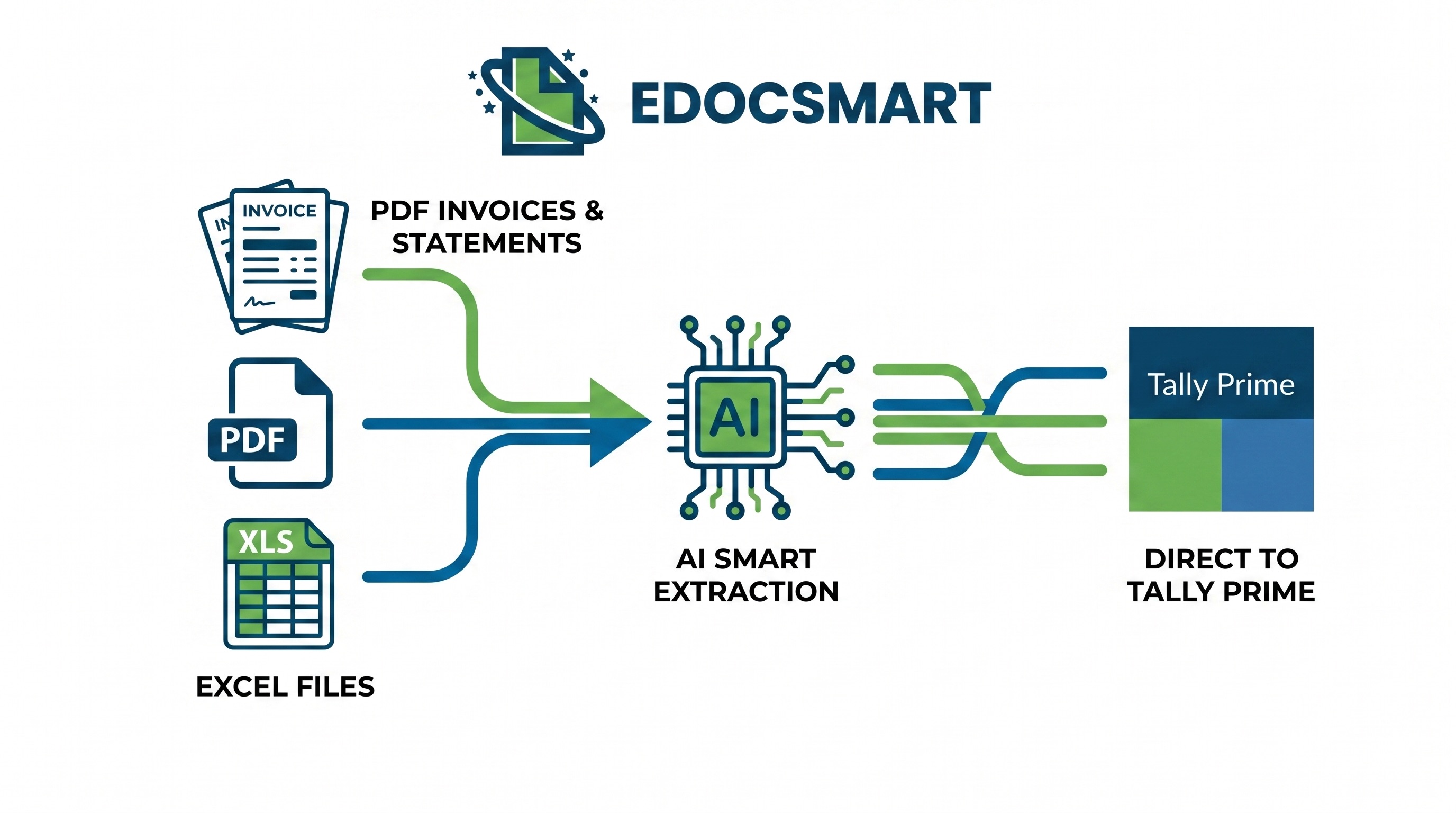
6. Eliminating the Manual Bottleneck: Streamlining Your Vouchers with EdocSmart
Think about your accounts department on any given Saturday. What are they doing? They are probably surrounded by stacks of paper purchase bills, or staring at a secondary monitor filled with PDF invoices sent by vendors over email or WhatsApp.
They are painstakingly typing in: 1. Vendor Names (and matching them to the correct ledger) 2. Invoice Numbers and Dates 3. Item Details, quantities, unit prices, and HSN codes 4. CGST, SGST, IGST values, and round-offs
This manual typing isn’t just slow—it’s highly prone to errors. A single mistyped number during a purchase invoice entry in tally prime can ruin your GSTR-2B matching, resulting in lost tax credits or audited compliance flags.
This is exactly where EdocSmart comes to the rescue.
What is EdocSmart?
EdocSmart is an intelligent document processing platform designed specifically to eliminate manual data entry for Indian businesses.
Instead of your accounting team spending hours typing out a purchase bill entry in tally with gst, they can simply upload the vendor’s PDF invoice into EdocSmart.
┌──────────────────────┐ ┌─────────────┐ ┌────────────────────────┐ │ Vendor sends Invoice │ ───> │ EdocSmart │ ───> │ Validated Voucher │ │ (PDF/Image) │ │ (AI OCR) │ │ Posted to Tally / Busy │ └──────────────────────┘ └─────────────┘ └────────────────────────┘
How EdocSmart Works with Your Accounting Software:
- Drop the Document: You upload any vendor bill—even if it’s a scanned copy or a complex purchase bill entry in tally gst pdf format.
- AI Extraction: EdocSmart’s advanced AI engines read the document. It instantly identifies the vendor name, GSTIN, invoice date, item tables, HSN codes, and tax breakdowns.
- Smart Validation: It checks the calculations (e.g., verifying if Qty × Rate plus GST actually matches the invoice total).
- Instant Integration: With one click, the system exports this data directly into your Tally Prime or Busy ERP setup.
No manual typing. No transposition errors. Your standard purchase invoice entry in tally is completed in less than 5 seconds instead of 5 minutes.
By integrating EdocSmart into your workflow, you convert your accounts team from slow data-entry clerks into highly efficient validation managers, saving hundreds of hours and protecting your business’s cash flow from ITC leakage.
7. Step-by-Step Guide: Navigating Essential GST and Purchase Entries
To understand why having automated data entry is so vital, let’s look at the actual step-by-step processes required to record these entries manually in Tally Prime.
Scenario A: Recording a Standard Purchase Invoice with GST
This is the daily bread-and-butter transaction for any business. Here is how to do purchase invoice entry in tally prime manually:
- Go to Vouchers: From the Gateway of Tally, press
V(Vouchers) and thenF9(Purchase). - Enter Vendor details: Input the Supplier Invoice Number and Invoice Date.
- Select Party Ledger: Choose the appropriate supplier ledger under Sundry Creditors.
- Select Purchase Ledger: Select your standard purchase account (e.g., “Purchase @ 18%”).
- Add Stock Items: List the stock items purchased. Type the quantity and rate for each item.
- Apply Tax Ledgers: Below the item horizontal line, select your CGST and SGST ledgers (for intra-state purchases) or IGST ledger (for inter-state purchases). Tally will calculate the tax automatically if your tax rates are configured correctly inside the stock items.
- Provide GST Details: Set Provide GST/E-Way Bill details to Yes if you need to capture transportation data.
- Save: Press
Ctrl + Ato accept and save the voucher.
Doing this manually for a single invoice with 10 different line items can take up to 10 minutes. If you have a backlog, this becomes an exhausting chore.
Scenario B: Handling Purchases from Unregistered Dealers (URD)
Sometimes, you buy small items from local vendors who do not have a GST registration. In these cases, you must make a without gst bill entry in tally prime.
- Go to Purchase Voucher: Press
Vand thenF9. - Select Party Ledger: Choose or create a ledger for the unregistered supplier. Under registration type, select Unregistered.
- Item Selection & Expense Ledger: Select your items or expense ledger (e.g., “Office Stationery Expense”).
- GST Treatment: Because the dealer is unregistered, no tax ledgers (CGST/SGST) are selected on the invoice.
- Tax Applicability: Ensure that the transaction is marked as Exempt or Nil Rated under GST details so it reflects correctly in GSTR-1 and GSTR-3B under non-GST outward/inward supplies.
Using automated tools like EdocSmart ensures that whether a transaction has complex taxes or is a simple without gst bill entry in tally prime, the system automatically detects the unregistered status of the vendor’s GSTIN and drafts the voucher with the exact configurations required, preventing manual setting slip-ups.
Scenario C: The GST Payment Entry
Once you calculate your liability at the end of the month, you pay the balance net GST to the government. Here is what is the gst payment entry in tally:
- Go to Payment Voucher: From the Gateway of Tally, press
Vand thenF5(Payment). - Autofill (Stat Payment): Press
Ctrl + F(Autofill) and select Stat Payment. - Tax Type: Select GST.
- Payment Period: Enter the start and end dates of the tax month (e.g., 01-Apr-2026 to 30-Apr-2026).
- Payment Type: Select Regular.
- Debit Tax Ledgers: Debit your output tax ledgers (Output CGST, Output SGST, Output IGST) to clear your liability.
- Credit Bank Ledger: Credit your bank ledger from which the GST Challan payment was made.
- Provide Payment Details: Set Provide GST Details to Yes and input the Challan Identification Number (CIN), CPIN, Payment Date, and Bank BRN number to ensure a clean tax audit trail.
Comparative Reference: Legacy vs. Modern Accounting
If you are upgrading from legacy setups, here is a quick reference table of how modern procedures map to older methods:
| Task / Ledger Requirement | Legacy: Tally ERP 9 / Old Busy | Modern: Tally Prime / Busy ERP 2026 |
|---|---|---|
| How to start a purchase bill | Searching for
how to entry purchase bill in tally erp 9 with gst manually.
|
Direct, automated menu shortcuts with integrated active e-invoicing hooks. |
| Document Processing | Manually reading a paper list and typing line-by-line. | Extracting files directly using EdocSmart from electronic PDFs. |
| GSTR-2B Matching | Relying on complex manual Excel exports and VLOOKUP sheets. | Direct API-based imports and automated matching algorithms. |
| Legacy Entry Reference | Running a generic
purchase invoice entry in tally erp 9 with separate tax rates.
|
Streamlined, simplified single-ledger structures with automated tax routing. |
8. Real-World Case Study: How an Automotive Components Manufacturer Saved 120 Hours/Month
Let’s look at a real-world scenario of an Indian manufacturing business dealing with high transactions.
The Company: “Rajesh Polymers”
Based in the industrial hub of Pune, Rajesh Polymers manufactures custom rubber gaskets and plastic components for automotive OEMs. They deal with over 150 raw material suppliers and process approximately 1,200 purchase invoices every single month.
     ┌────────────────────────────────────────────────────────┐
                            │             RAJESH POLYMERS OPERATIONAL STATS          │
                            ├────────────────────────────────────────────────────────┤
                            │  Monthly Purchases:  1,200 invoices                    │
                            │  Avg. Line Items:    12 per invoice                    │
                            │  Manual Entry Time:  ~120 Hours per month              │
                            │  Errors/Mismatches:  8% to 12% discrepancy rate        │
                            └────────────────────────────────────────────────────────┘
The Challenge
Rajesh Polymers was using Busy ERP on-premise for their detailed inventory tracking (handling raw granules, masterbatches, and mold numbers). While their inventory tracking was flawless, their accounts team of three people was falling behind on data entry.
Every vendor bill came as a PDF or printed copy. Because of the manual data entry bottleneck, the team was always 10 to 15 days behind on entering purchase bills. As a result: * Production teams could not see updated raw material stock levels in Busy ERP in real-time. * The monthly GSTR-2B reconciliation was a nightmare. They constantly missed claiming legitimate ITC because invoices were not entered into their system before the filing deadlines. * Typographical mistakes in HSN codes and GSTINs led to frequent tax discrepancies.
The Solution
Instead of hiring more data entry clerks, Rajesh Polymers integrated EdocSmart into their workflow.
- Now, as soon as a raw material truck arrives at the factory gate with a delivery challan and invoice, the gate officer or the accounts team scans the invoice and uploads it to EdocSmart.
- EdocSmart reads the document, extracts the line items, matches the vendor GSTIN, and checks it against their purchase order.
- It pushes the completed purchase bill entry in tally with gst directly into their Busy ERP database within seconds.
The Results
- Time Saved: The time spent on data entry plummeted from 120 hours a month to just 10 hours a month (spent only on reviewing and verifying exceptions).
- Zero ITC Leakage: Since bills are entered into Busy ERP on the same day they are received, Rajesh Polymers matches their GSTR-2B daily. They recovered over ₹4.5 Lakhs in unclaimed ITC in the first quarter alone.
- Flawless Inventory: Raw material levels update in real-time, allowing the production floor to plan their manufacturing shifts without stockout surprises.
9. The Tax Consultant’s Lens: Why CAs Prefer Tally vs. Busy
When you ask a Chartered Accountant (CA) or tax professional which platform they consider the best gst software for ca offices, their perspective is slightly different from a business owner’s.
 ┌───────────────────────────────────────────────────────────────┐
                        │                    CHARTERED ACCOUNTANT VIEWS                 │
                        ├───────────────────────────────────────────────────────────────┤
                        │ "Tally Prime is my comfort zone. I can open multiple audits,  │
                        │ check ledger groupings via shortcuts, and export data         │
                        │ directly to XML in seconds."                                  │
                        │                                                               │
                        │ "Busy ERP is incredible for my client audits with heavy       │
                        │ inventory trading. It flags mismatching tax rates cleanly     │
                        │ right at the voucher stage."                                  │
                        └───────────────────────────────────────────────────────────────┘
Historically, CAs favor Tally Prime because of its Audit Trail (Edit Log) features and effortless XML/Excel data synchronization. A CA can simply ask their client for a Tally backup file, restore it on their computer in seconds, and start verifying entries immediately. It is the widely recognized benchmark for audit compliance in India.
However, many modern CAs are now naming Busy ERP as the best gst software in india for operational manufacturing clients, citing its strict user controls. In Tally, an untrained clerk can easily alter a past transaction, changing a tax ledger or value by mistake. Busy’s structural blocks prevent these late modifications, giving auditors more peace of mind that the books haven’t been modified post-reconciliation.
10. The Final Verdict: Which Software Wins for Your Business?
There is no one-size-fits-all answer here. The winner depends entirely on your business model, scale, and operational priorities in 2026.
Choose Tally Prime If:
- You want a software that is fast, reliable, and highly keyboard-friendly.
- You want to hire accounting staff quickly without spending weeks training them.
- Your operations are simple—mainly services, trading, or straightforward manufacturing.
- Your Chartered Accountant manages your books remotely and prefers Tally backups.
Choose Busy ERP If:
- You run a distribution, retail, or manufacturing business handling a large number of SKUs with batch numbers, expiry dates, or product sizes.
- You need strict user access controls to prevent clerks from modifying historical entries.
- You want high customization of invoices, barcodes, and reports without paying for custom coding.
The Bottom Line for Peak Efficiency:
Whichever platform you choose, the true key to scaling your business in 2026 lies in eliminating manual processes. Relying on manual entry for your daily gst invoice entry in tally prime or Busy ERP slows your operations down and leaves you vulnerable to tax compliance issues.
By pairing your Tally Prime or Busy ERP setup with EdocSmart, you automate the tedious parts of your business, giving your finance team the freedom to focus on strategic growth and tax optimization.
11. Frequently Asked Questions (FAQs)
Can I use EdocSmart with older systems like Tally ERP 9?
How does EdocSmart process handwritten or poorly printed bills?
What is the main difference between Tally Prime and Busy ERP in terms of pricing?
How do I handle a transaction where the supplier doesn’t charge GST?
Is it possible to migrate all my historical data from Busy ERP to Tally Prime (or vice versa)?
How does GSTR-2B reconciliation work if I use automated invoice capture tools?
Can I generate e-way bills directly from both Tally Prime and Busy ERP?
Ready to Automate Your Indian Accounting
Workflow?
Don’t let manual data entry slow your business down. Start streamlining your GST vouchers, purchase orders, and expense bookings today.
[Try EdocSmart for Free today] and experience the power of automated accounting data entry!
Reduce repetitive accounting work
Explore a practical EDOCSMART workflow for faster, structured accounting automation.
Explore EDOCSMART